AGENTICAI-01
AGENTICAI-01 is the DMZ-hosted web application server for the lab. It runs a full-stack agentic AI resume application — a React frontend backed by a Python/FastAPI server — exposed externally through nginx acting as a reverse proxy. The machine is intentionally reachable from WAN_NET as a target for attack simulation scenarios.
VM Hardware Configuration
| Feature | Configuration |
|---|---|
| OS | Ubuntu Server 22.04.5 |
| vCPU | 2 |
| RAM | 2 GB |
| Disk | 50 GB |
| Network | DMZ_NET (Static IP: 192.168.10.6) |
[!IMPORTANT] In VirtualBox, the NIC must be attached to DMZ_NET.
OS Installation & Initial Configuration
Install Ubuntu Server
Install Ubuntu Server 22.04.5 using default options.
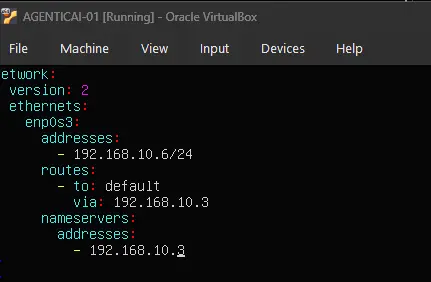
Network Configuration (Netplan)
Set a static IP on DMZ_NET before proceeding.
Update & Upgrade
sudo apt update && sudo apt upgrade -y
Install VirtualBox Guest Additions
sudo apt install -y virtualbox-guest-utils virtualbox-guest-additions-iso
sudo reboot
Application Deployment
resumeapp is a full-stack agentic AI resume application. The backend is a Python/FastAPI server; the frontend is a React single-page app built with Vite.
Deploy Application Source
Copy the application source code onto the server at /opt/resumeapp.

Backend — Python 3.14
Ubuntu 22.04 does not ship Python 3.14. Add the deadsnakes PPA first.

sudo apt update
sudo apt install -y python3.14

Create a virtual environment and install dependencies:
cd /opt/resumeapp/server
python3.14 -m venv venv
source venv/bin/activate
pip install -r requirements.txt
Frontend — Node.js
Ubuntu 22.04’s packaged Node.js is outdated. Use nvm to install the LTS release. Reference: nvm-sh/nvm
curl -o- https://raw.githubusercontent.com/nvm-sh/nvm/v0.39.7/install.sh | bash
source ~/.bashrc
nvm install --lts
nvm use --lts
node --version
Install dependencies and build the frontend:
cd /opt/resumeapp/client
npm install
npm run build
Start and Stop Scripts
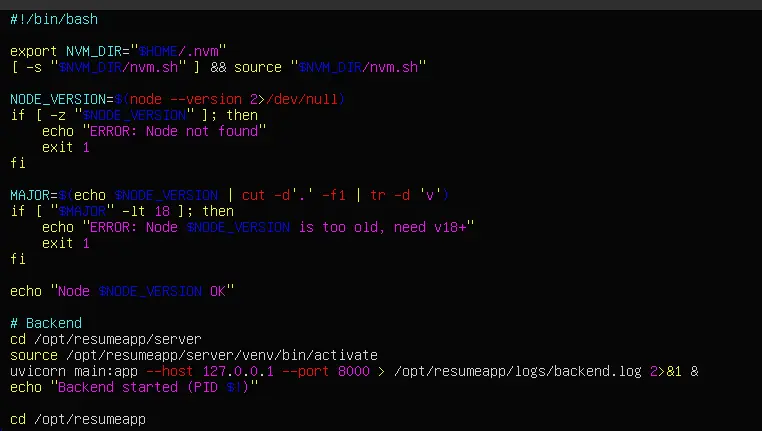
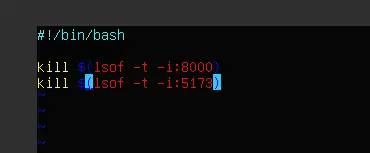
Create helper scripts to manage the application processes.
Start script:
Stop script:
Network Exposure (DNAT & pfSense)
Two rule changes are required to expose AGENTICAI-01 to WAN_NET and allow its Wazuh agent to reach WAZUH-SIEM01 — one on EDGE-RTR01 and one on pfSense.
EDGE-RTR01 iptables
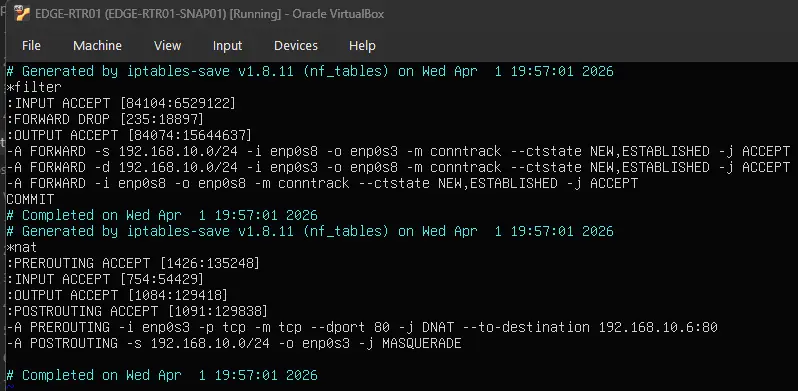
Two rules were added:
| Table | Chain | Rule | Purpose |
|---|---|---|---|
| filter | FORWARD | 3rd rule (top to bottom) | Permits packets originating from and destined for devices within DMZ_NET to be forwarded. Required so AGENTICAI-01’s Wazuh agent can reach WAZUH-SIEM01 on LAN_NET via pfSense — without this, the FORWARD chain’s default DROP policy would silently block the traffic. |
| nat | PREROUTING | — | DNAT rule that rewrites the destination of inbound WAN_NET packets on port 80 to 192.168.10.6:80, exposing the application to external traffic. |
pfSense
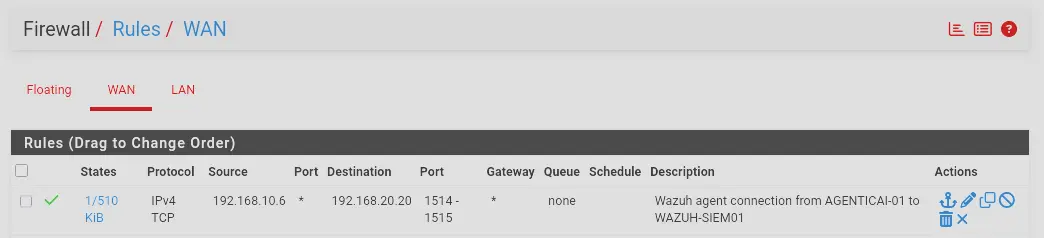
A firewall rule on the WAN interface (which faces DMZ_NET) permits TCP traffic from 192.168.10.6 to WAZUH-SIEM01 (192.168.20.20) on ports 1514–1515:
| Port | Purpose |
|---|---|
| 1515 | Wazuh agent enrollment |
| 1514 | Ongoing agent event forwarding |
Hosting with nginx
Why nginx
nginx acts as a reverse proxy, sitting in front of both the frontend and backend. It is the only service exposed on port 80 — the backend binds to 127.0.0.1 and is never directly reachable from the network, and the frontend is served as static files rather than running a dev server. This means only a single DNAT rule is needed on the edge router.
Install nginx
sudo apt install -y nginx
Build the Frontend
cd /opt/resumeapp/client
source ~/.bashrc
nvm use --lts
npm run build
Output goes to /opt/resumeapp/client/dist/.
Copy Static Files to /var/www
/var/www/ is the standard web root and is accessible by www-data (the nginx user). The source code stays in /opt/resumeapp/.
sudo mkdir -p /var/www/resumeapp
sudo cp -r /opt/resumeapp/client/dist/* /var/www/resumeapp/
sudo chown -R www-data:www-data /var/www/resumeapp
Create nginx Config
sudo nano /etc/nginx/sites-available/resumeapp
server {
    listen 80;

    root /var/www/resumeapp;
    index index.html;

    location / {
        try_files $uri $uri/ /index.html;
    }

    location /api/ {
        proxy_pass http://127.0.0.1:8000/;
        proxy_set_header Host $host;
        proxy_set_header X-Real-IP $remote_addr;
    }
}
location /— serves static frontend files; falls back toindex.htmlfor React client-side routinglocation /api/— proxies API calls to the backend; the browser never contacts the backend directly
Enable the Site and Reload nginx
sudo ln -s /etc/nginx/sites-available/resumeapp /etc/nginx/sites-enabled/
sudo rm /etc/nginx/sites-enabled/default
sudo nginx -t
sudo systemctl reload nginx
Update iptables DNAT to Port 80
Remove the old frontend DNAT rule and replace with a single rule pointing to nginx on port 80:
iptables -t nat -D PREROUTING -i enp0s3 -p tcp -m tcp --dport 5173 -j DNAT --to-destination 192.168.10.6:5173
iptables -t nat -A PREROUTING -i enp0s3 -p tcp -m tcp --dport 80 -j DNAT --to-destination 192.168.10.6:80
Update Start Script
Bind the backend to 127.0.0.1 so it is not reachable from outside the machine. Remove the frontend startup block entirely — nginx serves the static files directly.
# Backend
cd /opt/resumeapp/server
source /opt/resumeapp/server/venv/bin/activate
uvicorn main:app --host 127.0.0.1 --port 8000 > /opt/resumeapp/logs/backend.log 2>&1 &
echo "Backend started (PID $!)"
systemd Service (Auto-start on Boot)
The backend is managed as a systemd service so it starts automatically on boot without relying on the manual start script.
Create the Service Unit
sudo nano /etc/systemd/system/resumeapp.service
[Unit]
Description=ResumeApp Backend
After=network.target

[Service]
Type=simple
WorkingDirectory=/opt/resumeapp/server
ExecStart=/opt/resumeapp/server/venv/bin/uvicorn main:app --host 127.0.0.1 --port 8000
Restart=on-failure
StandardOutput=append:/opt/resumeapp/logs/backend.log
StandardError=append:/opt/resumeapp/logs/backend.log

[Install]
WantedBy=multi-user.target
[!NOTE] Use the full path to
uvicorninside the venv — systemd does not source shell profiles, sosource venv/bin/activatehas no effect here.
[!IMPORTANT] The service runs as root by default (no
User=directive). This is intentional —AGENTICAI-01is a deliberately vulnerable target for attack simulation.
Enable and Start
sudo systemctl daemon-reload
sudo systemctl enable resumeapp
sudo systemctl start resumeapp
sudo systemctl status resumeapp
daemon-reload— tells systemd to pick up the new unit fileenable— creates the symlink so it starts on bootstart— starts it immediately without rebooting
Wazuh Agent
Install
curl -so wazuh-agent.deb https://packages.wazuh.com/4.x/apt/pool/main/w/wazuh-agent/wazuh-agent_4.9.2-1_amd64.deb
WAZUH_MANAGER='192.168.20.20' WAZUH_AGENT_NAME='AGENTICAI-01' dpkg -i ./wazuh-agent.deb
systemctl daemon-reload
systemctl enable wazuh-agent
systemctl start wazuh-agent
pfSense Firewall Rule
Traffic from AGENTICAI-01 to WAZUH-SIEM01 enters pfSense on its WAN interface (which is the DMZ). The rule must be on the WAN tab in pfSense:
| Field | Value | |
|---|---|---|
| Protocol | TCP | |
| Source | 192.168.10.6 |
|
| Destination | 192.168.20.20 |
|
| Destination Port Range | 1514 – 1515 |
EDGE-RTR01 iptables FORWARD Rule
By default the FORWARD chain is DROP. Traffic from AGENTICAI-01 destined for 192.168.20.20 is routed through EDGE-RTR01 and forwarded out the same interface (enp0s8 → enp0s8). No existing rule covered same-interface forwarding, so this must be added on EDGE-RTR01:
iptables -A FORWARD -i enp0s8 -o enp0s8 -m conntrack --ctstate NEW,ESTABLISHED -j ACCEPT
Verify Enrollment
systemctl status wazuh-agent
sudo tail -30 /var/ossec/logs/ossec.log
Agent should appear as active in the Wazuh dashboard at https://wazuh.lab.internal.
FIM Real-time Monitoring for /etc
By default Wazuh scans /etc on a schedule (every 12 hours). For real-time detection of writes to /etc/cron.d/ during attack simulation, configure realtime monitoring via agent.conf on WAZUH-SIEM01 (pushed to all agents in the default group):
sudo nano /var/ossec/etc/shared/default/agent.conf
<agent_config>
  <syscheck>
    <directories realtime="yes">/etc</directories>
  </syscheck>
</agent_config>
sudo systemctl restart wazuh-manager
Verify the agent received the config:
sudo tail -f /var/ossec/logs/ossec.log | grep syscheck