#cyberdefender-easy #threat-hunting #splunk #finished #reviewed
Scenario
Unusual network activity has been detected within a university environment, indicating potential malicious intent. These anomalies, observed six hours ago, suggest the presence of command and control (C2) communications and other harmful behaviors within the network.
Your team has been tasked with analyzing recent network traffic logs to investigate the scope and impact of these activities. The investigation aims to identify command and control servers and uncover malicious interactions.
Questions
Q1 — IP Address of initial access
During the investigation of network traffic, unusual patterns of activity were observed in Suricata logs, suggesting potential unauthorized access. One external IP address initiated access attempts and was later seen downloading a suspicious executable file. This activity strongly indicates the origin of the attack. What is the IP address from which the initial unauthorized access originated?
Let’s get a high level overview of the logs to orient ourselves. We first check what available sources there are using the following command
| metadata type=sourcetypes
| dedup sourcetype
| table sourcetype
Which gets us,
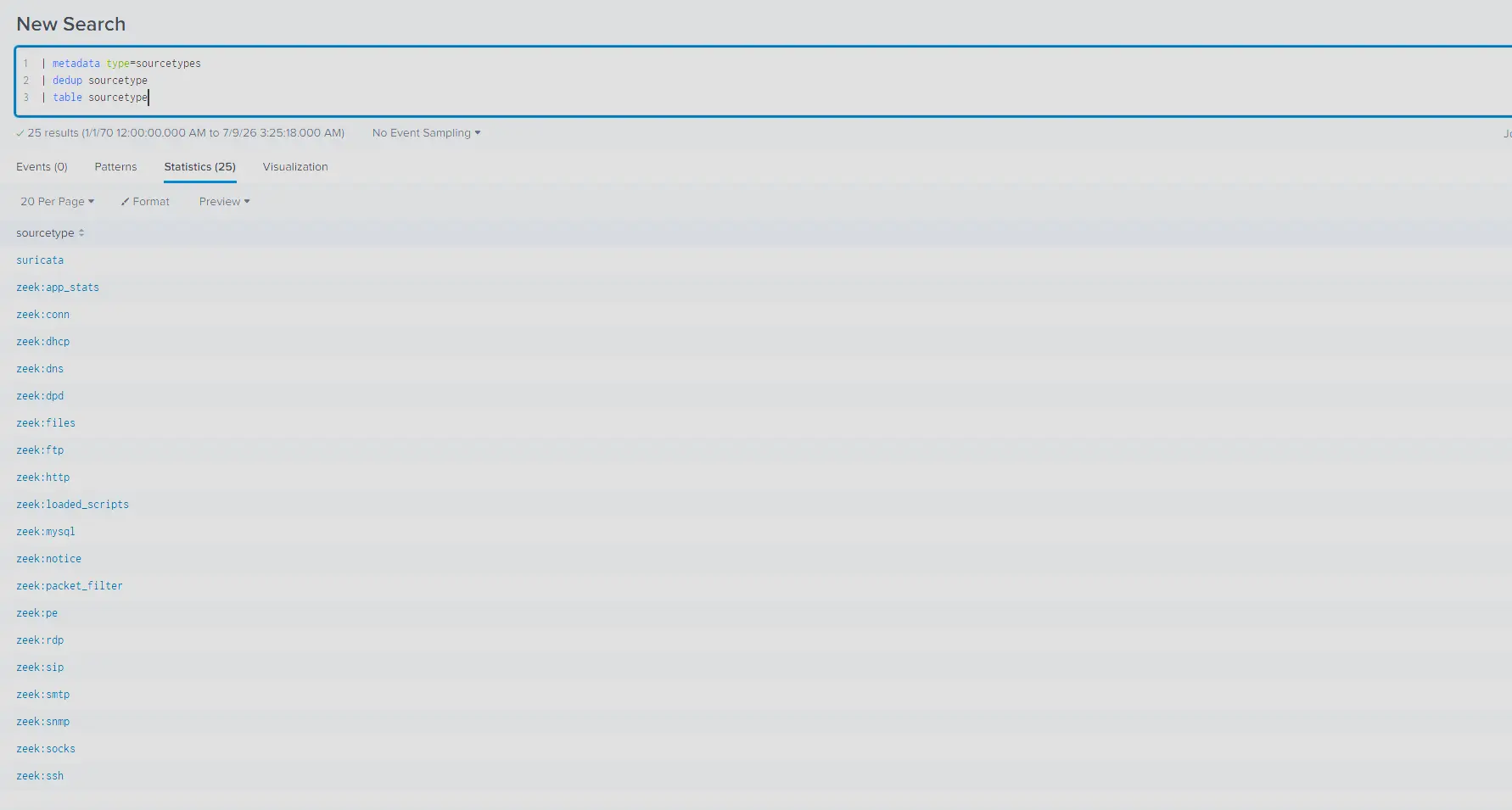
Available source types
This dataset contains entirely zeek and suricata logs.
A few things that can help us get started is through the information provided in the question which tells us that
- Unusual patterns of activity were observed in
suricatalogs - One external IP initiated access attempts
- One external IP downloaded a suspicious executable file
The downloading of a suspicious file means we should start by looking at http traffic.
Let’s create a query on the suricata logs filtering for just http logs that aggregates them by dest_ip and retrieve values of src_ip, http_user_agent and url.
This allows us to see the server IPs being connected to, which IP is connecting to them, the user agent being used to connect and the urls that were accessed.
index=* sourcetype="suricata" event_type="http"
| stats values(src_ip) values(http_user_agent) values(url) values(hostname) values(http_refer) by dest_ip
Which gets us,
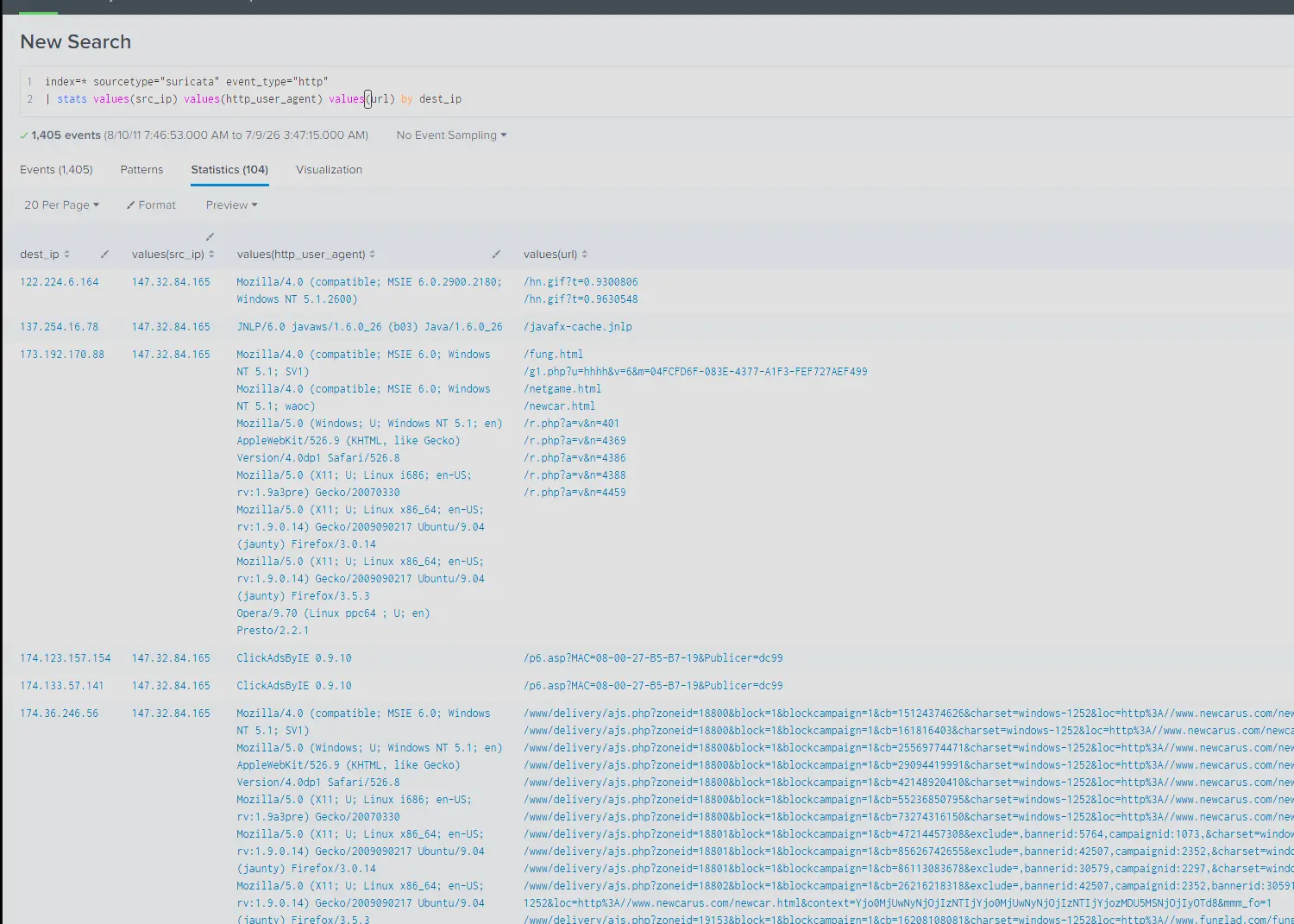
Snippet of search result
Scrolling down, we will see a server that was connected to using with http_user_agent value of Download.
This is not a standard http_user_agent and if we look at the urls that were accessed. We will see that every url is only corresponding to executable files. There was no landing page or any other resources, the endpoint connecting to this server purely just downloaded some files.

Suspicious IP
Furthermore, the naming of the both the endpoints and the resources seem purposefully obfuscated or meaningless which is in stark contrast to the other entries found in our search.
In conclusion, this server stands out with the rest of the traffic because not only does it fit the description of the anomaly described in the provided questions, it also used a non-standard user agent and only served executable files to connecting endpoints.
Answer: 195.88.191.59
Q2 — Domain Name of attack server
Investigating the attacker’s domain helps identify the infrastructure used for the attack, assess its connections to other threats, and take measures to mitigate future attacks. What is the domain name of the attacker server?
Having identified the suspicious IP, we can query the dns logs to see what domain name was resolved.
However, the suricata dns logs break up the events such that the IP being queried is not included in the answer for the query.
We can query zeek:dns instead which gives us the full picture in a single log message.
index=* sourcetype="zeek:dns" 195.88.191.59
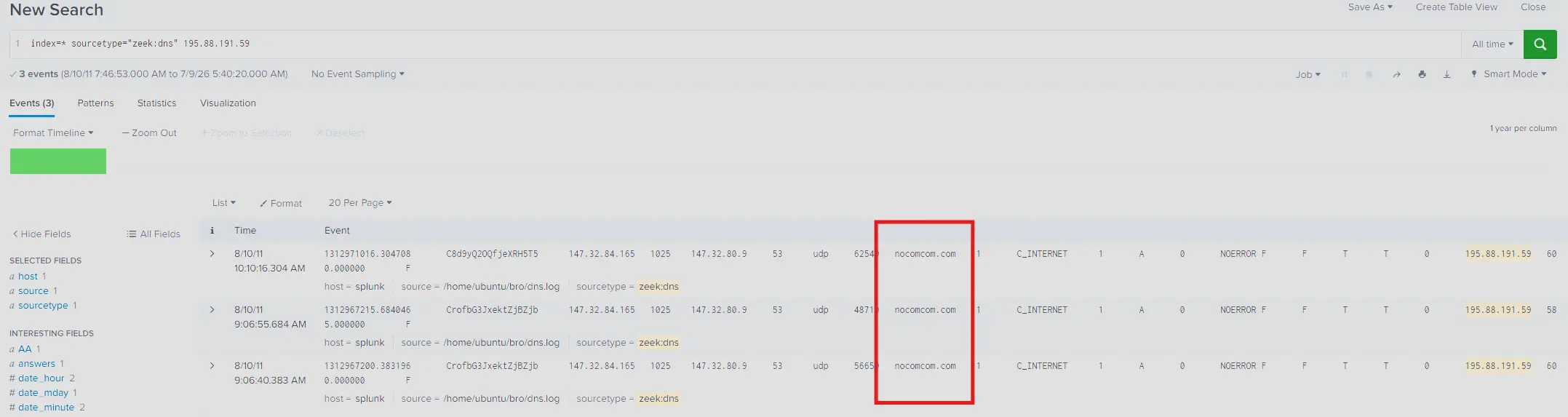
DNS query results
Which tells us that the resolved domain name is nocomcom.com
Answer: nocomcom.com
Q3 — IP Address of targeted system
Knowing the IP address of the targeted system helps focus remediation efforts and assess the extent of the compromise. What is the IP address of the system that was targeted in this breach?
When identifying the suspicious activity, we found both the suspicious server as well as the endpoints connecting to it by the query,
index=* sourcetype="suricata" event_type="http"
| stats values(src_ip) values(http_user_agent) values(url) values(hostname) values(http_refer) by dest_ip
This gives us the IP of the targeted system under values(src_ip) which is 147.32.84.165.
Query result
Answer: 147.32.84.165
Q4 — Number of files transferred
Identify all the unique files downloaded to the compromised host. How many of these files could potentially be malicious?
To identify all unique files downloaded we can just query zeek:files and filter where tx_hosts is 195.88.191.59 and md5 is unique.
index=* sourcetype="zeek:files" tx_hosts="195.88.191.59"
| dedup md5
| table tx_hosts conn_uids md5 sha1 sha256 filename mime_type total_bytes
Which gives us,
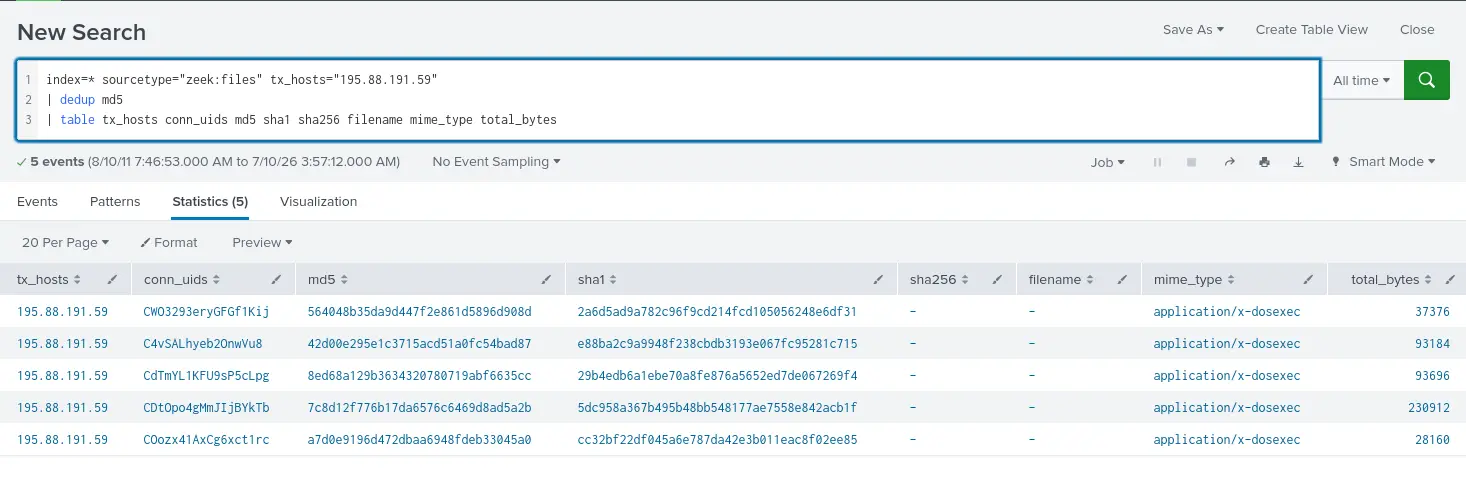
unique files transferred
This shows us unique 5 unique results which is our answer.
Answer: 5
Q5 — SHA256 hash of malicious file
What is the SHA256 hash of the malicious file disguised as a
.txtfile?
Notice how in the previous question our query gave us no returned values in sha256 and filename?
To find the sha256 hash of a specific file we first need to match the md5 hash values to their corresponding uri.
This allows us to determine which of the md5 hash values actually belong to the .txt file.
We can do that by joining zeek:http and zeek:files on uid.
However, zeek:files does not have a uid field and instead has a conn_uids field.
This is because the same file can show up in multiple connections.
Therefore, we need to explode and rename this field first into their own rows before performing the join otherwise it will fail.
This gives us the query,
index=* sourcetype="zeek:http" "195.88.191.59"
| join type=left uid
    [ search index=* sourcetype="zeek:files" "195.88.191.59"
      | mvexpand conn_uids
      | rename conn_uids as uid ]
      | dedup md5
      | table _time uri md5 sha1 user_agent rx_hosts tx_hosts
Which tells us that the md5 hash value of the .txt file is 564048b35da9d447f2e861d5896d908d.
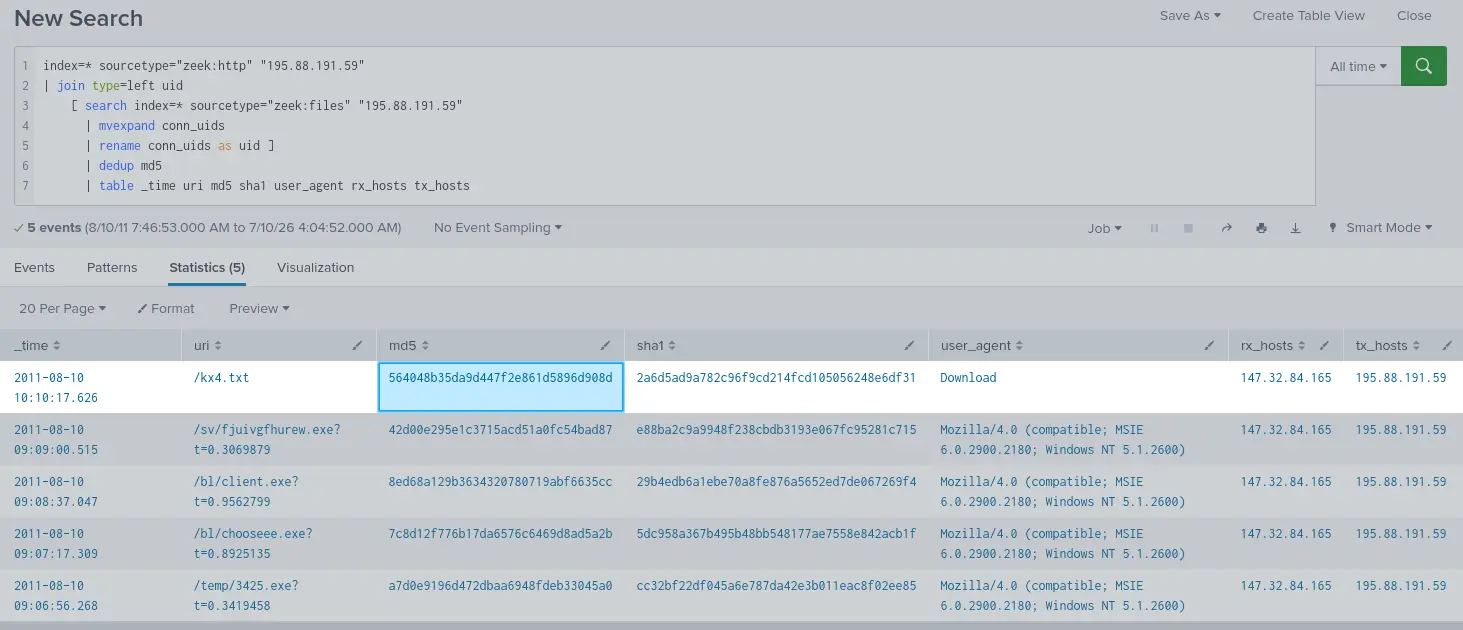
Search results
Using OSINT platforms like VirusTotal we can find the sha256 hash of this file.
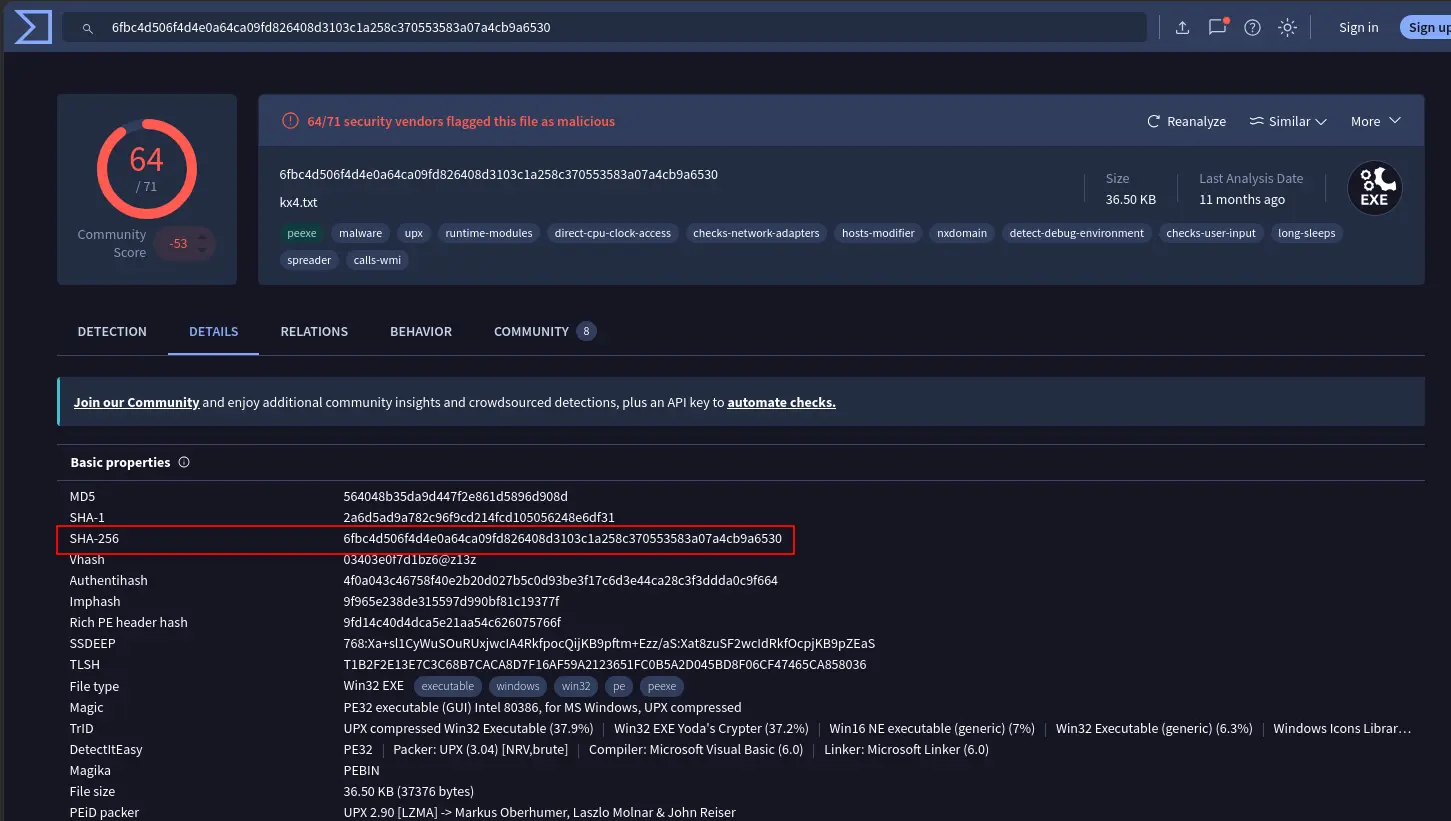
VirusTotal Reports
Therefore our answer is 6fbc4d506f4d4e0a64ca09fd826408d3103c1a258c370553583a07a4cb9a6530.
Answer: 6fbc4d506f4d4e0a64ca09fd826408d3103c1a258c370553583a07a4cb9a6530
Completion
I successfully completed NerisBot Blue Team Lab at @CyberDefenders! https://cyberdefenders.org/blueteam-ctf-challenges/achievements/francisvil3213/nerisbot/
#CyberDefenders #CyberSecurity #BlueYard #BlueTeam #InfoSec #SOC #SOCAnalyst #DFIR #CCD #CyberDefender