Cybersecurity Home Lab: Introduction
This project documents the design, implementation, and operation of a virtualized enterprise network environment with two core learning objectives. The first is infrastructure engineering — building a realistic multi-zone network (WAN, DMZ, and LAN) from scratch, covering routing, firewalling, network segmentation, and security monitoring. The second is AI security research — deploying a real agentic AI application as a deliberate attack target in the DMZ and systematically exploring its attack surface within a realistic network context.
Attack Simulations
| # | Simulation | Attack Summary | Detection | Detection Summary |
|---|---|---|---|---|
| 1 | Agentic AI Exploitation | Prompt injection against a vulnerable agentic AI application in the DMZ — results in arbitrary file write as root with no privilege escalation required. | Agentic AI Detection | Wazuh FIM alert on /etc/cron.d anchors the investigation. HTTP access logs, application logs, and Suricata flow records confirm prompt injection origin and three established reverse shell sessions. |
Project Scope
The lab focuses on an on-premises enterprise network emulating a small organization. Key areas of focus include:
- Network Segmentation: Implementing a DMZ and internal trusted networks.
- Defensive Capabilities: Deploying SIEM and vulnerability management tools.
- Incident Response: Validating security controls through simulated attacks.
- Agentic AI Attack Surface: Deploying an intentionally vulnerable agentic AI application in the DMZ and exploring its exposure to external threats in a realistic network environment.
Core Objectives
- Network Segmentation: Design and implement three distinct zones: WAN, DMZ, and LAN.
- Firewall & Routing: Deploy pfSense as the primary security gateway to enforce inter-zone policies.
- Edge Services: Utilize an upstream Edge Router for NAT and DNS resolution for the DMZ.
- Identity Management: Establish an Active Directory (AD) domain for centralized endpoint management.
- Security Monitoring (Wazuh): Deploy Wazuh for endpoint detection, alert generation, and correlation across the environment.
- Security Monitoring (Suricata): A Network TAP (SURICATA-BR01) sits inline between PFSENSE-FW01, capturing all the network traffic in LAN_NET. This will provide NIDS. In the DMZ_NET
- Vulnerability Management: Use Nessus to identify and prioritize remediation of system misconfigurations.
- Attack Simulation: Execute external threat scenarios originating from WAN_NET against lab infrastructure and the DMZ-hosted agentic AI application to validate detection and prevention controls.
- Agentic AI Security Research: Deploy
AGENTICAI-01— an intentionally vulnerable agentic AI application — in the DMZ and systematically explore its attack surface, including prompt injection, tool abuse, and privilege escalation through AI-driven actions. - Technical Documentation: Maintain comprehensive records of lab architecture and findings.
Lab Architecture & Design
Network Topology
-1.webp)
Network Segment Rationale
| Segment | Trust Level | Description |
|---|---|---|
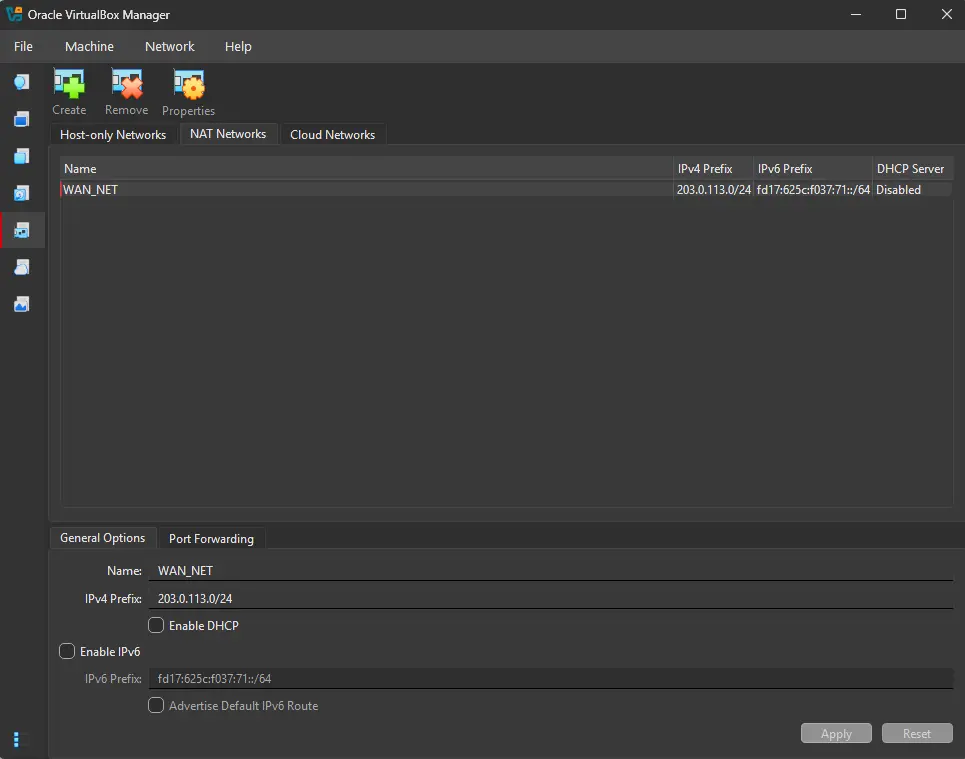
| WAN_NET | Untrusted | Simulates the public internet (TEST-NET-3, 203.0.113.0/24). This is the origin point for all simulated external threats. |
| DMZ_NET | Screened | Acts as a buffer between WAN and LAN (192.168.10.0/24). Hosts publicly accessible services. Requires two-boundary traversal to reach the LAN. |
| LAN_NET | Trusted | The core internal zone (192.168.20.0/24). Protected by a default-deny policy on the pfSense firewall. |
Design Decisions
Wazuh
Wazuh’s three central components - wazuh-indexer, wazuh-manager and wazuh-dashboard - are deployed on a single host WAZUH-SIEM01 as an all-in-one installation.
This is appropriate for the scale of this environment; with fewer than 10 endpoints, log volume is well within the capacity of a single host.
In a larger enterprise environment, these components would typically run on dedicated servers to support horizontal scaling and high availability.
Network Configuration
VirtualBox Network Mapping
| Network Segment | VirtualBox Type | IP Address Space | Rationale |
|---|---|---|---|
| WAN_NET | NAT Network | 203.0.113.0/24 |
Simulates public IP space; provides outbound access. |
| DMZ_NET | Internal Network | 192.168.10.0/24 |
Isolated segment for DMZ services. |
| LAN_NET | Internal Network | 192.168.20.0/24 |
Isolated segment for internal endpoints. |
[!IMPORTANT] WAN_NET and DMZ_NET use static addressing. All IP addresses in these segments are assigned manually. Internal segments like LAN_NET utilize DHCP provided by pfSense for dynamic client configuration.
Asset Inventory
| VM Name | Role | OS | vCPU | RAM | Storage | NIC 1 (Network / IP) | NIC 2 (Network / IP) | NIC 3 (Network / IP) |
|---|---|---|---|---|---|---|---|---|
| EDGE-RTR01 | Edge Router | Ubuntu Server 25.10 | 1 | 512MB | 10GB | WAN: 203.0.113.3/24 |
DMZ: 192.168.10.3/24 |
- |
| PFSENSE-FW01 | Firewall | pfSense | 1 | 2GB | 16GB | DMZ: 192.168.10.4/24 |
LAN: 192.168.20.1/24 |
- |
| ATTACKER01 | Threat Actor | Kali Linux | 2 | 2GB | 20GB | WAN: 203.0.113.4/24 |
DMZ: 192.168.10.5/24 |
LAN: DHCP |
| DC01 | Domain Controller | Windows Server 2019 | 4 | 4GB | 60GB | LAN: 192.168.20.10/24 |
- | - |
| WAZUH-SIEM01 | SIEM Server | Ubuntu Server 22.04.5 | 4 | 4GB | 50GB | LAN: 192.168.20.20/24 |
- | - |
| SURICATA-BR01 | Network TAP and NIDS | Ubuntu Server 22.04.5 | 2 | 4GB | 50GB | LAN:192.168.20.30/24 |
||
| NESSUS-SCAN01 | Vuln Scanner | Tenable Core | 2 | 4GB | 50GB | LAN: 192.168.20.40/24 |
- | - |
| PC01 | Workstation | Windows 11, version 22H2 (22621.4108) amd64 | 2 | 4GB | 64GB | LAN: DHCP |
- | - |
| AGENTICAI-01 | Vulnerable Agentic AI App | Ubuntu Server 22.04.5 | 2 | 2GB | 50GB | DMZ: 192.168.10.6/24 |
Domains
| Attribute | Value | Description |
|---|---|---|
| Forest Root Domain | lab.internal |
Primary DNS name of the forest |
| NetBIOS Name | LAB |
Used for legacy compatibility and pre-windows 2000 login |
DNS Hostnames
| Hostname | IP | Service | Host VM |
|---|---|---|---|
wazuh.lab.internal |
192.168.20.20 |
Wazuh Dashboard (HTTPS) | WAZUH-SIEM01 |
suricata.lab.internal |
192.168.20.30 |
Suricata NIDS | SURICATA-BR01 |
IP Address Ranges
| Network Segment | IP Address Range | Description |
|---|---|---|
| LAN_NET | 192.168.20.1 - 192.168.20.99 |
Static IPs for devices requiring them (e.g. DC01) |
| LAN_NET | 192.168.20.100 - 192.168.20.199 |
DHCP IP range |
Credentials
All credentials here are intentionally weak. We are focusing on network segmentation, detection engineering, and attack simulation, not hardening authentication.
| VM Name | Username | Password | Additional | Description |
|---|---|---|---|---|
| EDGE-RTR01 | router-vm |
P@ssw0rd123 |
VM login | |
| PFSENSE-FW01 | admin |
P@ssw0rd123 |
Web interface login | |
| ATTACKER01 | kali |
kali |
VM Login | |
| DC01 | Administrator |
P@ssw0rd123 |
DSRM: P@ssw0rd123 |
Local administrator login |
| PC01 | jdoe@lab.internal |
P@ssw0rd123 |
Standard user login | |
| DC01 | fvillalon@lab.internal |
P@ssw0rd123 |
Domain Admin login | |
| WAZUH-SIEM01 | wazuh-siem01 |
P@ssw0rd123 |
VM / SSH login | |
| WAZUH-SIEM01 | admin |
6kN+Inwz2HU9GnTY*Fmt9DxshWLKTGbq |
https://wazuh.lab.internal/ |
Web interface login |
| AGENTICAI-01 | agenticai-01 |
P@ssw0rd123 |
VM Login | |
| SURICATA-BR01 | suricata-br01 |
P@ssw0rd123 |
suricata.lab.internal |
VM Login |
Security Monitoring
Wazuh Agent Groups
Wazuh groups allow a single agent.conf to be pushed uniformly to all agents in that group. Groups are managed from Agent Management → Groups on the Wazuh dashboard.
| Group | Purpose | Comments |
|---|---|---|
windows-baseline |
Common config for all Windows endpoints — Sysmon log ingestion | |
domain-controllers |
DC-specific config — AD event logs, stricter Sysmon policy | |
linux-baseline |
Common config for all Linux endpoints | |
dmz-servers |
DMZ-specific config — FIM on /etc with realtime monitoring |
|
dmz-resume-app |
Application log ingestion — /opt/resumeapp/logs/*.log |
Logs are viewed raw on archives index in discover tab of web UI. No custom decoder and as such no rules. |
suricata |
Suricata log ingestion — /var/log/suricata/eve.json |
|
edge-routers |
dnsmasq.log ingestion — /var/log/dnsmasq.log |
Logs are viewed raw on archives index in discover tab of web UI. No custom decoder and as such no rules. |
Agent Group Membership
| Device | Agent ID | Groups | Collection Method |
|---|---|---|---|
| WAZUH-SIEM01 | 000 |
— | Configured locally via /var/ossec/etc/ossec.conf |
| DC01 | — | windows-baseline, domain-controllers |
Wazuh agent |
| PC01 | — | windows-baseline |
Wazuh agent |
| AGENTICAI-01 | — | linux-baseline, dmz-servers, dmz-resume-app |
Wazuh agent |
| EDGE-RTR01 | — | linux-baseline, suricata, edge-routers |
Wazuh Agent |
| PFSENSE-FW01 | — | — | Syslog forwarding only |
| SURICATA-BR01 | — | linux-baseline, suricata |
Wazuh agent |
[!NOTE] WAZUH-SIEM01 is agent ID
000— the manager itself. It cannot be assigned to a group and is configured directly on the host.
Future Roadmap
[!NOTE] Backlog & Enhancements
- Evaluate VyOS as an alternative edge router. Current implementation is just a simple ubuntu server that forwards logs. IPs are set statically in DMZ so no DHCP implemented.
- Implement RADIUS/NPS for pfSense authentication.
- Deploy WSUS for lateral movement research (Update Injection).
- Add AI enrichment to SIEM logs or maybe n8n pipeline (SOAR) -> AI on Blue Team
- Security Monitoring (ELK): Deploy an ELK stack (Elasticsearch, Logstash, Kibana) with Beats agents and Sysmon for log ingestion, enrichment, and visualization.
- Work through the CIS Benchmarks for the critical devices in the lab
- Integrate YARA scanning, post-incident enhancement