#endpoint-forensics #volatility3 #hex-dump #byte-offset #cyberdefender-medium #reviewed #finished
Scenario
Investigate Windows memory images using Volatility3, PowerShell, and a hex editor to extract system artifacts, analyze processes, network connections, and reconstruct user activity.
Questions
Q1 — Time of RAM Image
What time was the RAM image acquired according to the suspect system?
Volatility 3 has a plugin, windows.info.Info, that provides basic information about the memory image being analyzed, including the acquisition timestamp.
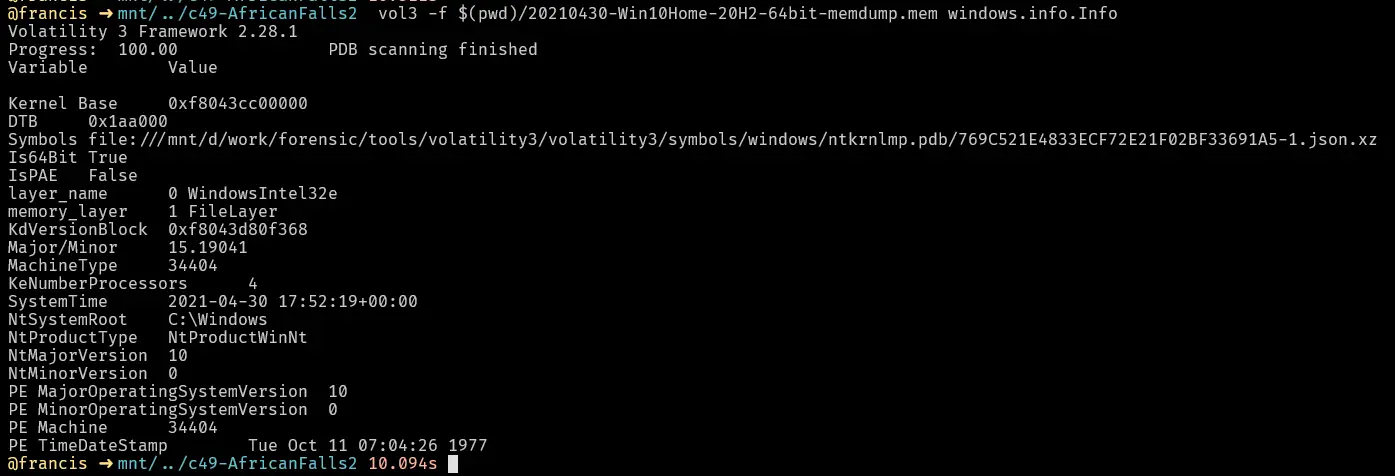
Volatility 3 windows.info output showing the image acquisition time.
Answer: 2021-04-30 17:52
Q2 — SHA256 Hash Value
What is the SHA256 hash value of the RAM image?
We can get this by just using sha256sum on Linux systems or running Get-FileHash in PowerShell on Windows.
sha256sum <memory.dmp>

SHA256 hash of the RAM image.
Answer: 9db01b1e7b19a3b2113bfb65e860fffd7a1630bdf2b18613d206ebf2aa0ea172
Q3 — Process ID of Brave
What is the process ID of brave.exe?
To find the process ID we use the plugin windows.pslist, which lists all the processes at the time of image capture.

Full windows.pslist output.

brave.exe entry showing its process ID.
Answer: 4856
Q4 — Number of Network Connections
How many established network connections were there at the time of acquisition?
To find out what network connections were established, we use the plugin windows.netscan and filter with grep -i established. This lists all the network connections and filters for the ones that were established.
grep -i established

windows.netscan output filtered to show only established connections.
Answer: 10
Q5 — Domain Name
Which domain name does Chrome have an established network connection with?
From the windows.netscan output, we see that Chrome has an established connection to 185.70.41.130.
We perform a whois lookup on this and find that it belongs to the domain protonmail.ch.

Chrome’s established connection to 185.70.41.130 in netscan output.
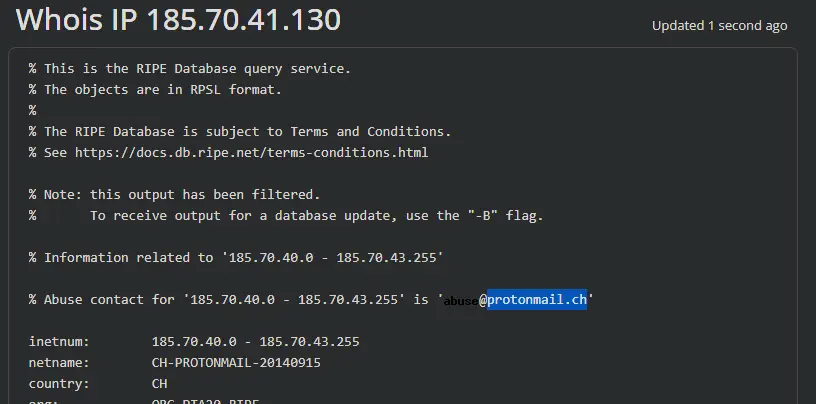
Whois lookup confirming 185.70.41.130 belongs to protonmail.ch.
Answer: protonmail.ch
Q6 — MD5 Hash of PID 6988
What is the MD5 hash value of the process executable for PID 6988?
In Volatility 3, to dump a process’s memory we use the plugin windows.pslist with arguments --dump --pid 6988.

Dumping the PID 6988 process executable with --dump --pid 6988.
Then we just use md5sum on Linux systems or Get-FileHash in PowerShell on Windows.

MD5 hash of the dumped executable.
Answer: 0b493d8e26f03ccd2060e0be85f430af
Q7 — Word at Offset
Can you identify the word that begins at offset 0x45BE876 and is 6 bytes long?
We can do this using xxd where:
-s → seek/start offset (byte offset)
-l → length of whatever we are seeking in bytes starting from offset
xxd -s 0x45BE876 -l 6 <memory.dmp>

xxd output showing the 6-byte value at offset 0x45BE876.
Or using HxD: Ctrl+G → enter the offset → cursor jumps to that byte.

HxD navigated to offset 0x45BE876.
Answer: hacker
Q8 — Creation Date & Time
What is the creation date and time of the parent process of powershell.exe?
In Volatility 3, we need to use windows.pslist and grep for the parent PID of powershell.
The reason we use windows.pslist and grep is because the Volatility 3 implementation of pstree does not include the creation date and time.

windows.pslist output showing powershell.exe’s parent process and its creation time.
Answer: 2021-04-30 17:39
Q9 — Last File Opened in Notepad
What is the full path and name of the last file opened in notepad?
To answer this we use windows.cmdline and grep for notepad.
This tells us how notepad is being invoked and what argument it is being invoked with (i.e. what files it was opening).
Thankfully, there is only one record, so we know the last file opened in notepad is this entry.

windows.cmdline output for notepad.exe showing the last opened file path.
Answer: C:\Users\JOHNDO~1\AppData\Local\Temp\7zO4FB31F24\accountNum
Q10 — Time Spent on Brave
How long did the suspect use Brave browser? (In Hours)
For this we use windows.registry.userassist, which tells us the total time the user had the window in focus.

windows.registry.userassist output showing Brave’s total focus time.
Answer: 4
Completion