#network-forensics #cyberdefender-medium #Wireshark #ZUI/Brim #finished #reviewed #CyberDefenders #CyberSecurity #BlueYard #BlueTeam #InfoSec #SOC #SOCAnalyst #DFIR #CCD #CyberDefender
Scenario
Instructions:
- Ensure that there are no blockers, such as Adblock extensions, that might prevent the lab from opening in a new tab or affect lab’s functionality.
- All the lab-related files and tools are on the desktop.
The attached PCAP belongs to an Exploitation Kit infection. As a security blue team member, analyze it using your favorite tool and answer the challenge questions.
Investigation
To start the investigation let’s check the statistics of the network capture in Wireshark. These often can point us in the right direction and help us to identify some leads to chase.
Statistics
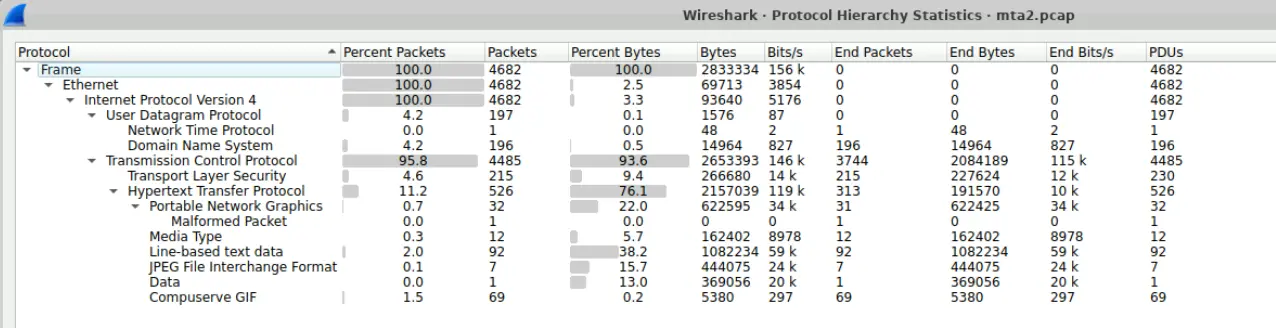
Let’s first look at the Statistics > Protocol Hierarchy.
Protocol Hierarchy
This tells us the following
95.8%of all captured packets areTCP11.2%of all captured packets areHTTP76.1%of all bytes are attributed toHTTP22.0%of all bytes are attributed toPNGdata15.7%of all bytes are attributed toJPEGdata- There is 1 malformed
PNGpacket. 38.2%of all bytes captured are attributed to Line-based text data.
Therefore, the majority of the captured network traffic is TCP and it seems that a non-negligible amount of data is attributed to image data with one packet being malformed.
Furthermore, the substantial amount of HTTP traffic should also be investigated.
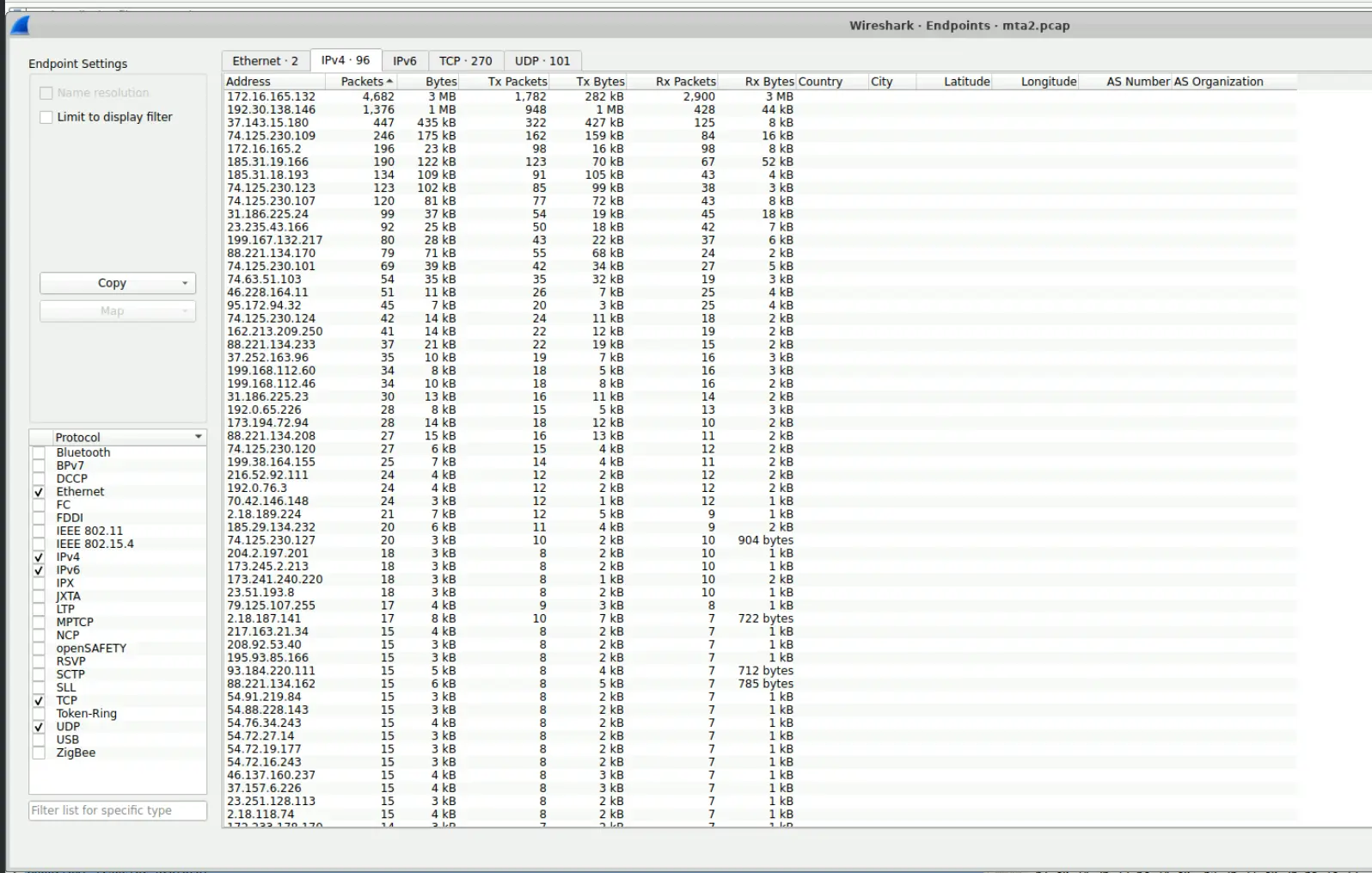
Let’s also look at Statistics > Endpoints.
Endpoints
Sorting by packets descending we will see that
172.16.165.132had the most packets attributed to it with a number of packets more than double than the second IP192.30.138.146while not having as much packets as172.16.165.132is also a substantial outlier compared to the other IPs.
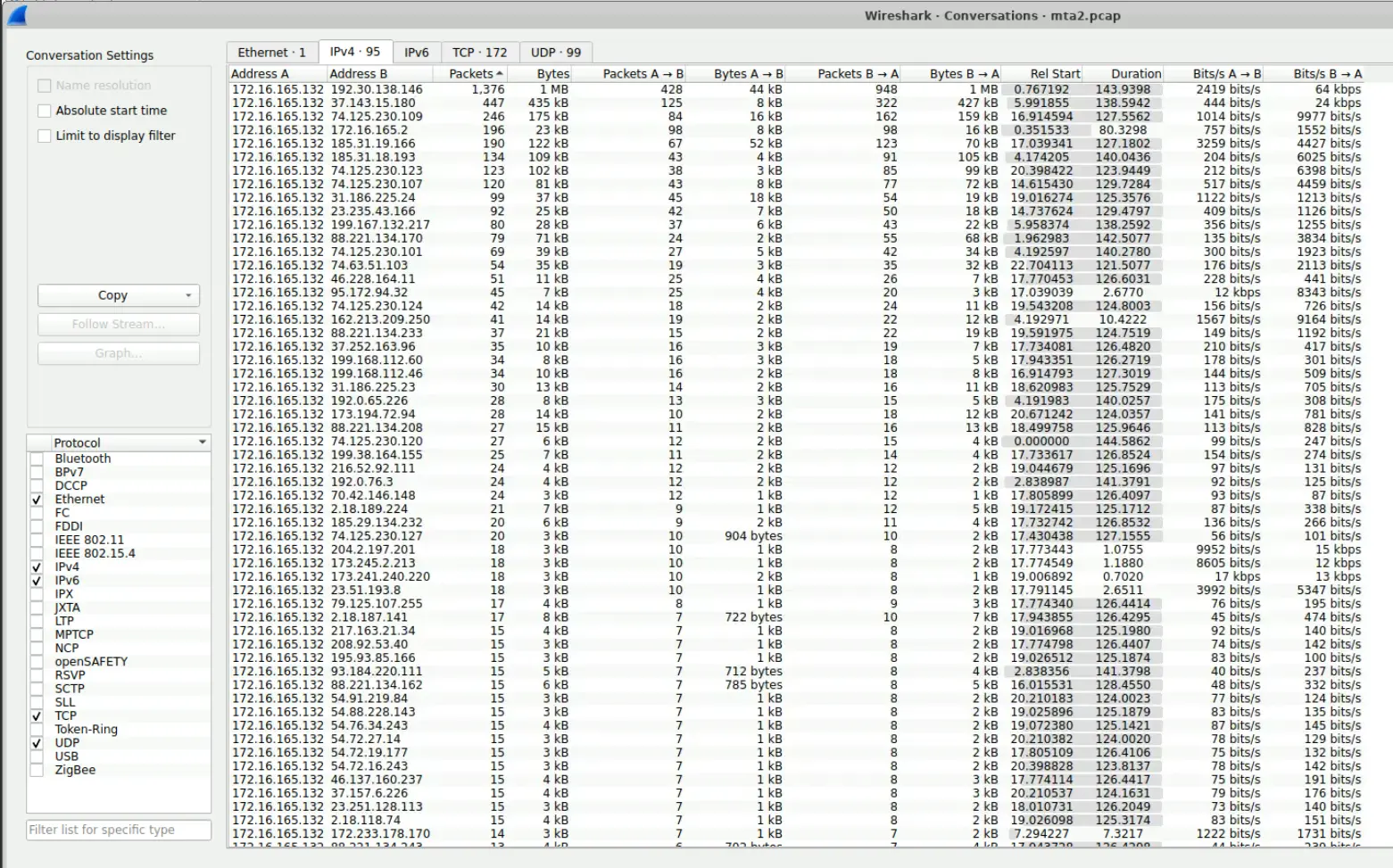
At the same time let’s also look at Statistics > Conversations.
Conversations IPv4
Interestingly, 172.16.165.132 conversed a lot with 192.30.138.146.
Furthermore, 172.16.165.132 has initiated conversations with numerous other IPs.
A majority of which lie in public address space and are short conversations.
These conversations also oddly have a similar number of packets shared between them.
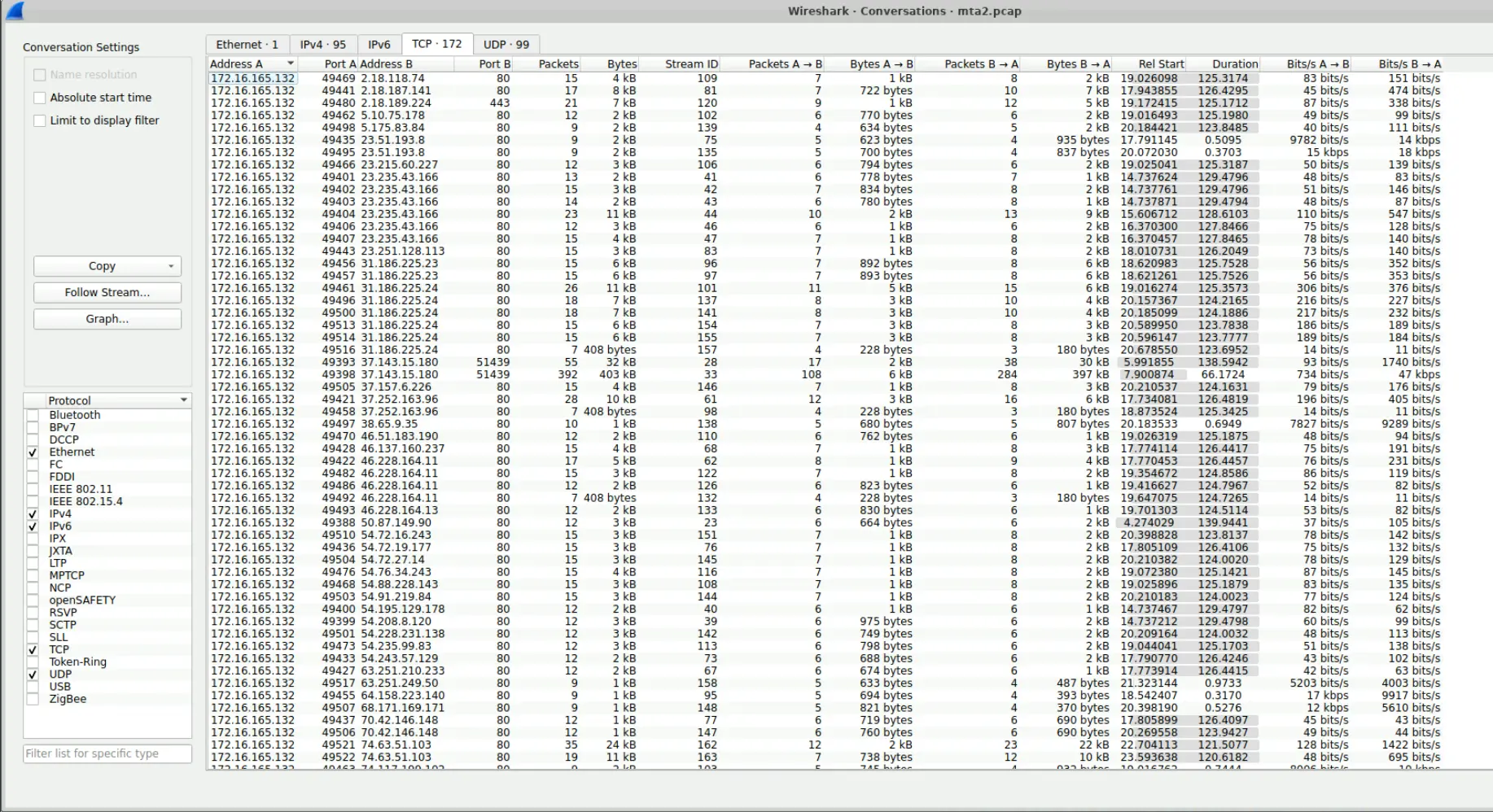
Let’s look at the TCP sessions captured.
Captured TCP sessions
Majority of the captured TCP sessions are on HTTP i.e. port 80. However, there are some abnormal ports being used here. If we look specifically at the following,

Sessions of interest
We will see that the port being used is 51439 and is a non-standard port. It does not map to any known service on the IANA registrar. Furthermore, the amount of data being transferred is significant with the size of the data being 403 kB. The IP being contacted here by 172.16.165.132 is also a public IP address 37.143.15.180.
This behaviour is highly suspect and warrants further investigation.
To summarise our findings thus far,
172.16.165.132and192.30.138.146have the highest amount of packets attributed to them and these two endpoints talked a lot with each other.37.143.15.180is a suspicious endpoint that was contacted by172.16.165.132on port51439.- Majority of the traffic is
HTTPandTCP, we should craft our queries to focus on these search spaces - A significant amount of the data transmitted is being attributed to image formats like
PNGandJPEG. - A single malformed
PNGpacket was automatically flagged by Wireshark
Anomalous TCP Session
In our triage of the network capture we found a TCP session between 37.143.15.180 and 172.16.165.132.
Let’s investigate this further and determine what type of traffic was being transmitted during this session.
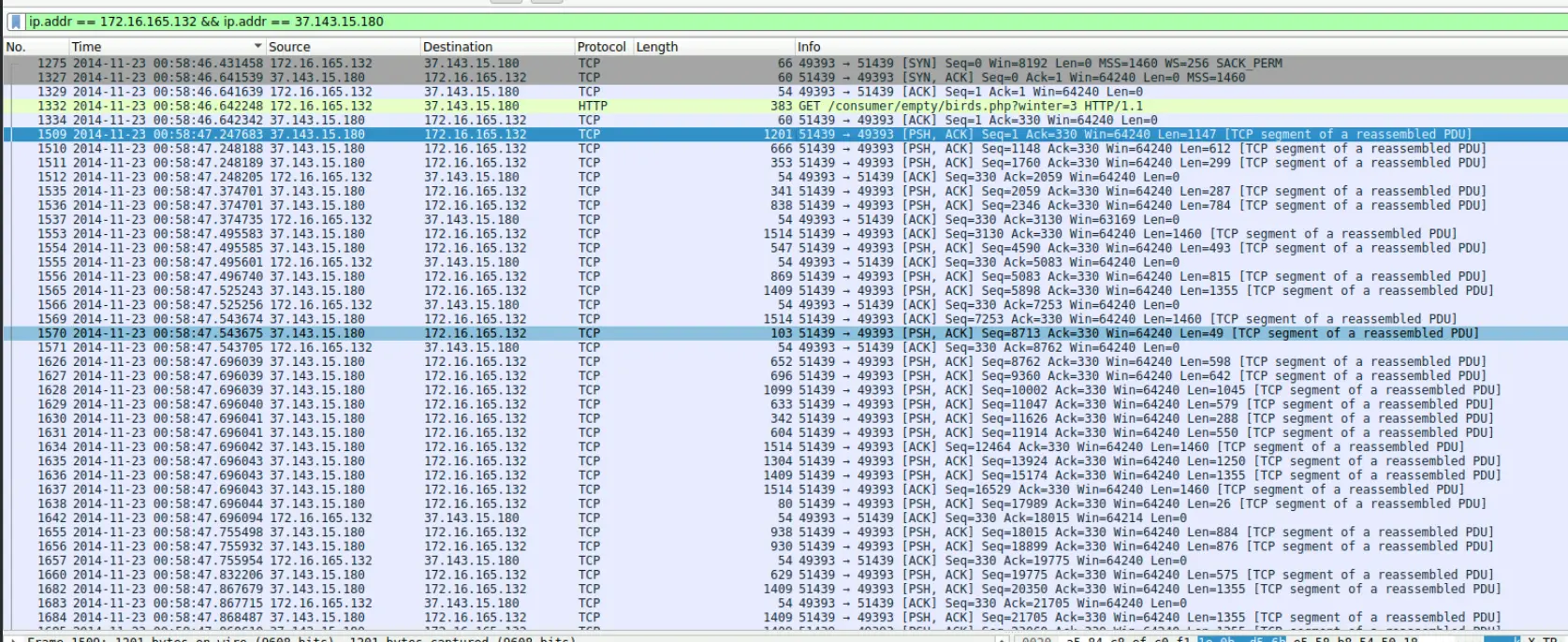
We first filter for packets related to the identified IPs.
ip.addr == 172.16.165.132 && ip.addr == 37.143.15.180
Which gives us
Snippet of query result
It shows that 172.16.165.132 requested a resource /consumer/empty/birds.php?winter=3. This is then followed by a chunk of TCP packets.
If we scroll down further we will see that it also requests another resource /cars.php?honda=1185&proxy=2442&timeline=4&jobs=823&image=171&join=757&list=679 . Following this request is an even larger chunk of TCP packets.
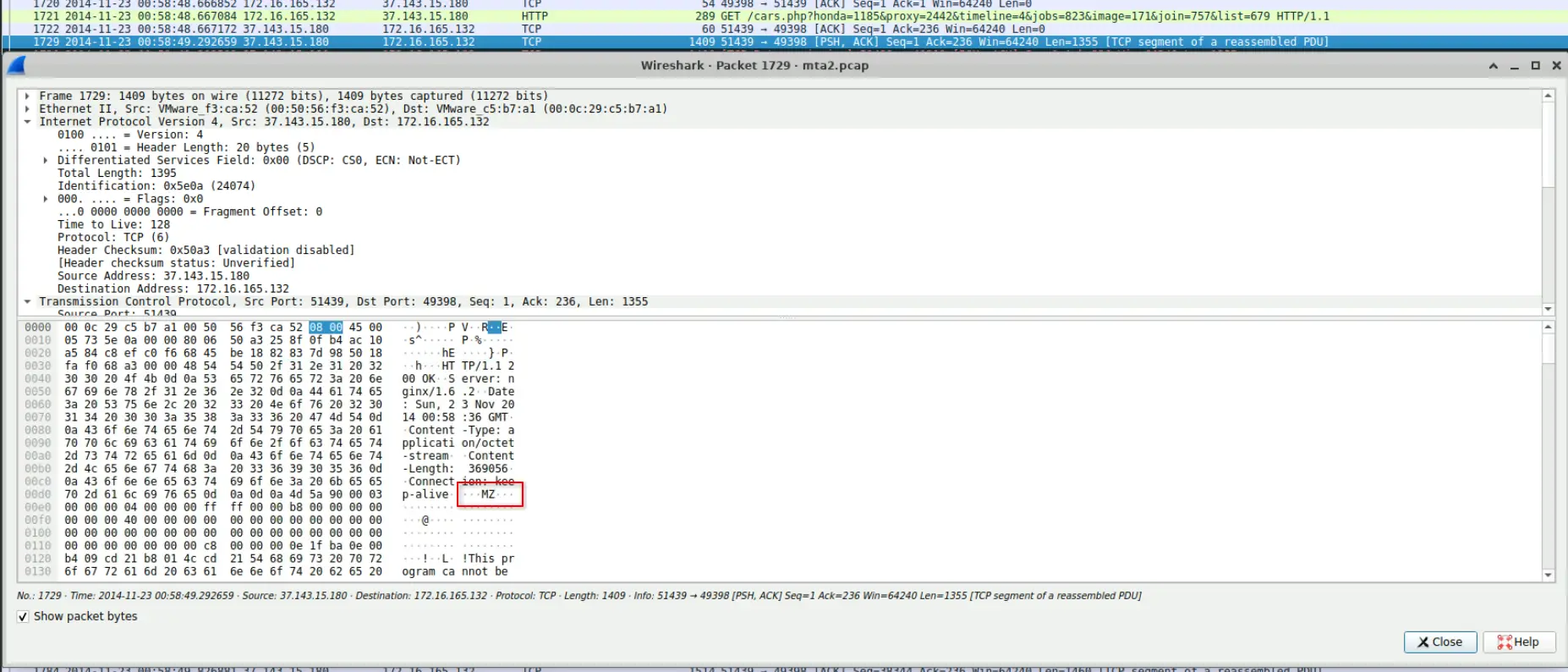
Furthermore, if we click on the first TCP packet with the PSH flag set after the request for /cars.php?honda=1185&proxy=2442&timeline=4&jobs=823&image=171&join=757&list=679 was made, we will see in the payload are the magic bytes for a Windows executable.
Magic bytes in TCP payload
We can also determine the FQDN’s of the server since we already know its IP. To determine the resolved FQDN’s, we search the captured DNS traffic in Wireshark through the query,
dns.a == 37.143.15.180
Which gives us,

Identified FQDN’s
Let’s also search for the transmitted files in ZUI/Brim.
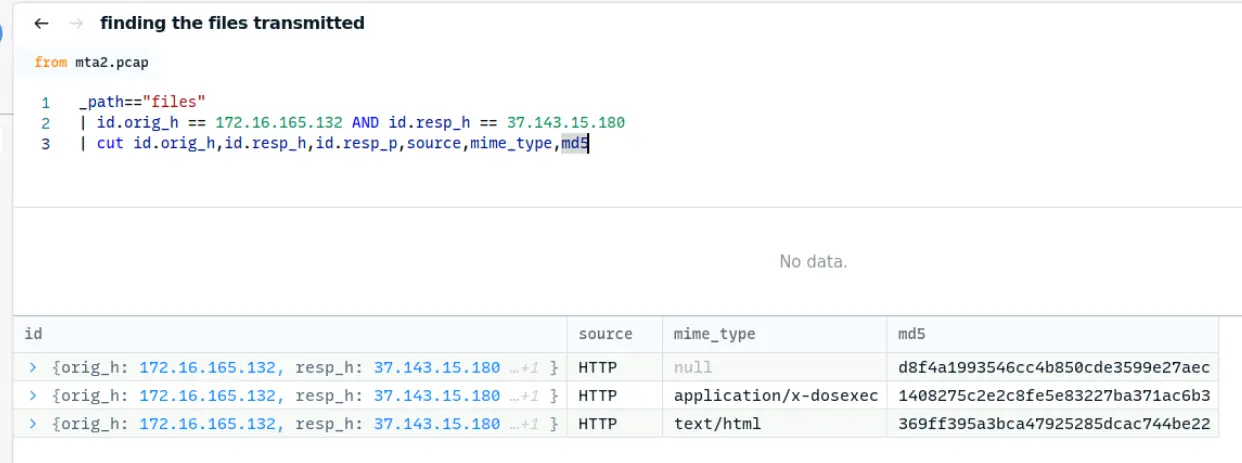
Finding the files are simple as we can just filter for _path=="files" and set the appropriate origin and responding hosts. We should also just cut the result so it is more concise. This gives us the query,
_path=="files"
| id.orig_h == 172.16.165.132 AND id.resp_h == 37.143.15.180
| cut id.orig_h,id.resp_h,id.resp_p,source,mime_type,md5
Which results in the following,
ZUI query result
The file that is interesting here is 2nd one being transmitted which has mime type application/x-dosexec.
Which means that the transmitted file is a Windows executable.
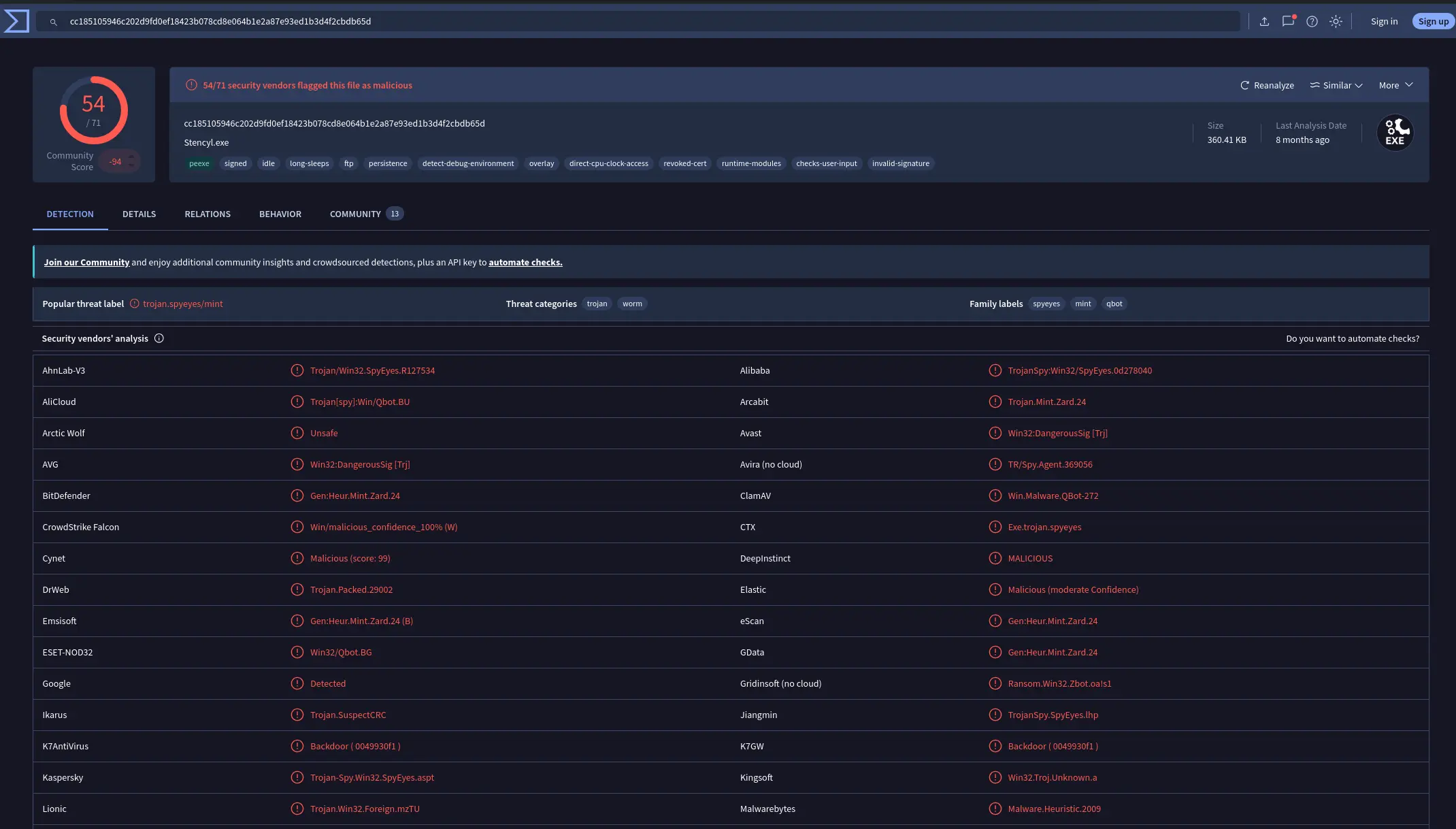
If we search this file’s md5 hash through OSINT platforms like VirusTotal we will see that is a known malware flagged by multiple vendors as seen in this report.
VirusTotal results
Searching this same hash in joesandbox.com also shows that this malware is QBot and is attributed to threat actor GOLD CABIN as detailed here.
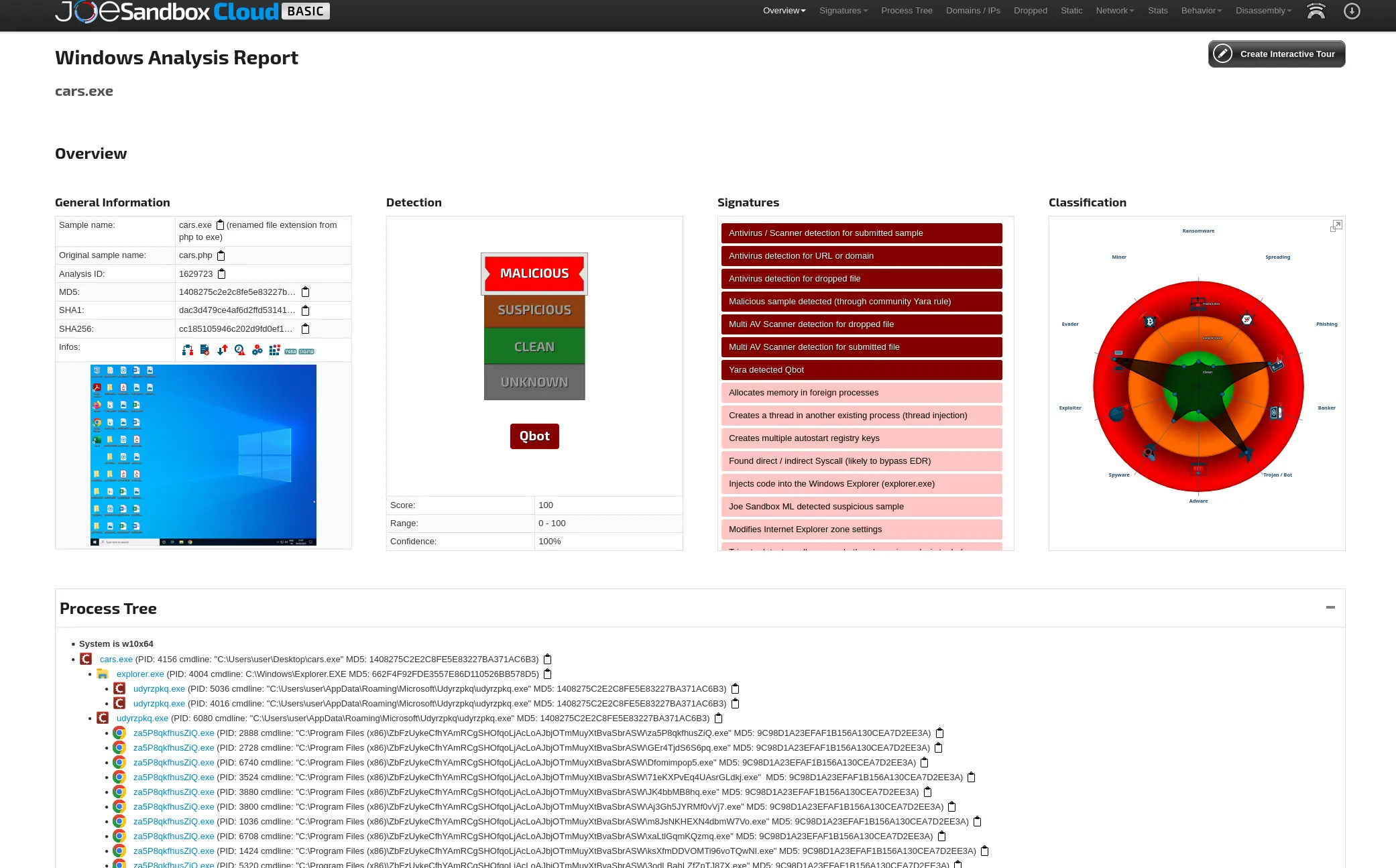
JoeSandbox analysis results
Also notice the timestamps of this network capture are in the year 2014.
If we google for information related to QBot in 2014 we will land on this article which talks about an incident where a SweetOrange ExploitKit was used to drop QBot.
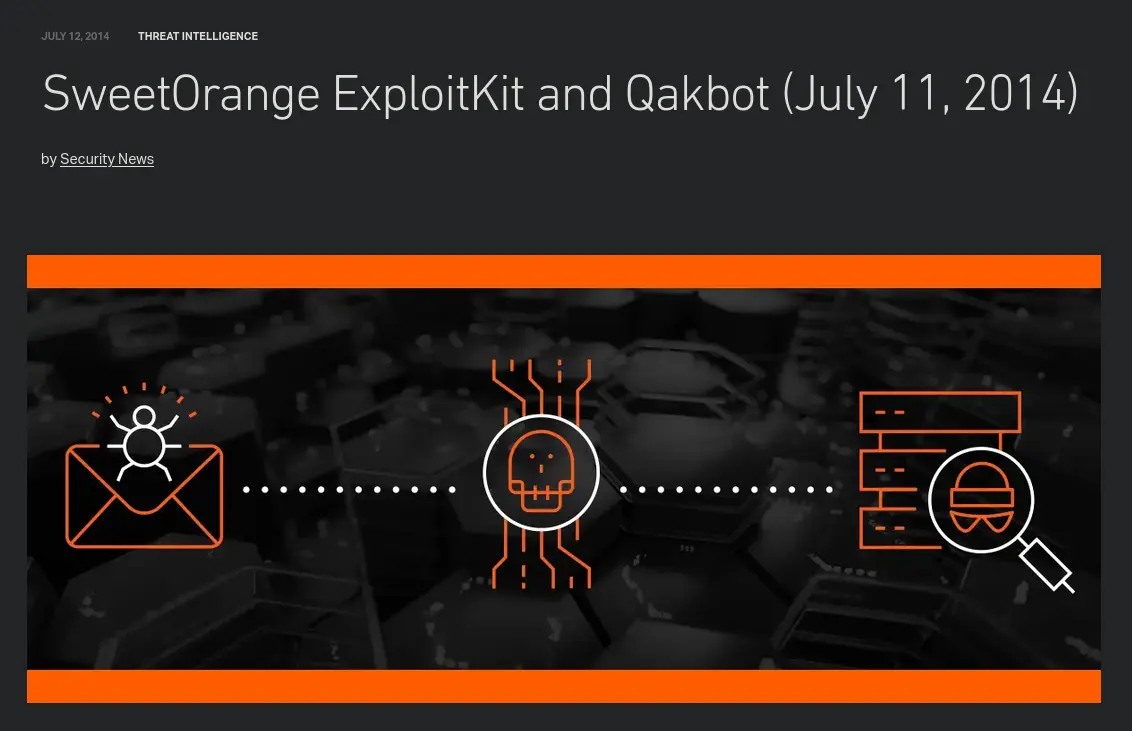
Header of article
Given the information we have gathered so far, we now know that 37.143.15.180 is a C2 server that serves the malware QBot. It has 2 FQDN’s which are g.trinketking.com and h.trinketking.com. We also know that 172.16.165.132 is the victim of the infection and is likely a Windows device given how the transferred file is a dos executable. We also know from reports about QBot during this time frame that one of the exploit kits being used to drop the malware was Sweet Orange.
Identifying Redirect
Having identified the malware that was dropped, we still need to determine what caused 172.16.165.132 to initiate that request in the first place.
If we look at the HTTP requests between 172.16.165.132 and 37.143.15.180, we will see that the first GET request had referrer Referer: http://hijinksensue.com/\r\n.
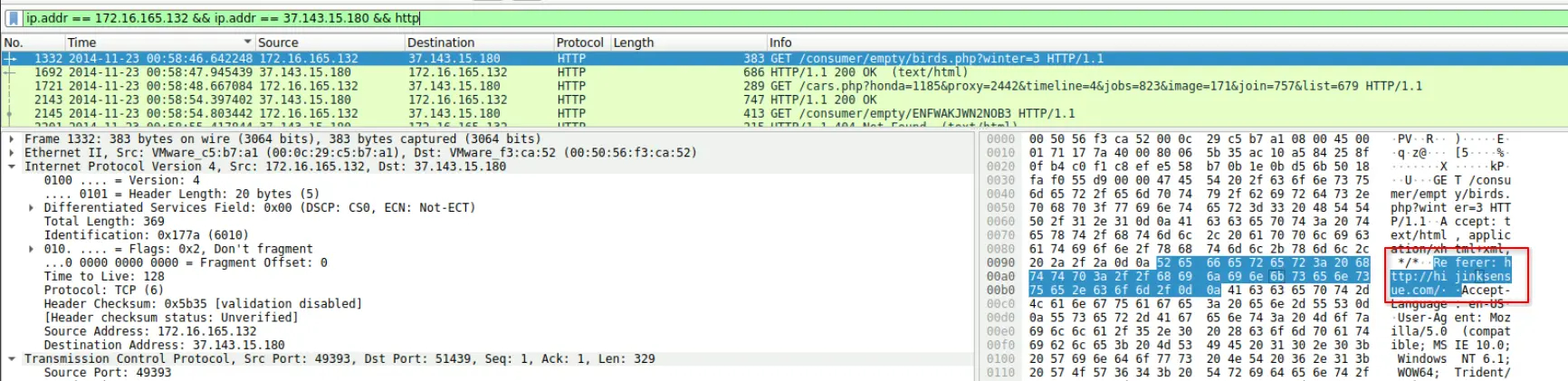
Referrer for first GET request
If we filter the DNS queries looking for what IP resolved to this domain, we will find 192.30.138.146 which is the other IP we identified early on. The query we used to find this is
dns && dns.qry.name contains "hijink"
Which tells us the IP of the server for that FQDN is 192.30.138.146,

Wireshark DNS query result
We can also look for frames just before frame number 1332 satisfying ip.addr == 172.16.165.132.
Frame number 1332 corresponds to the first GET request to the malicious server so by scoping our search to just before that, we can find how 172.16.165.132 reached it.
For this we use the query,
ip.addr == 172.16.165.132 && frame.number <= 1332 && http
Which gives us,
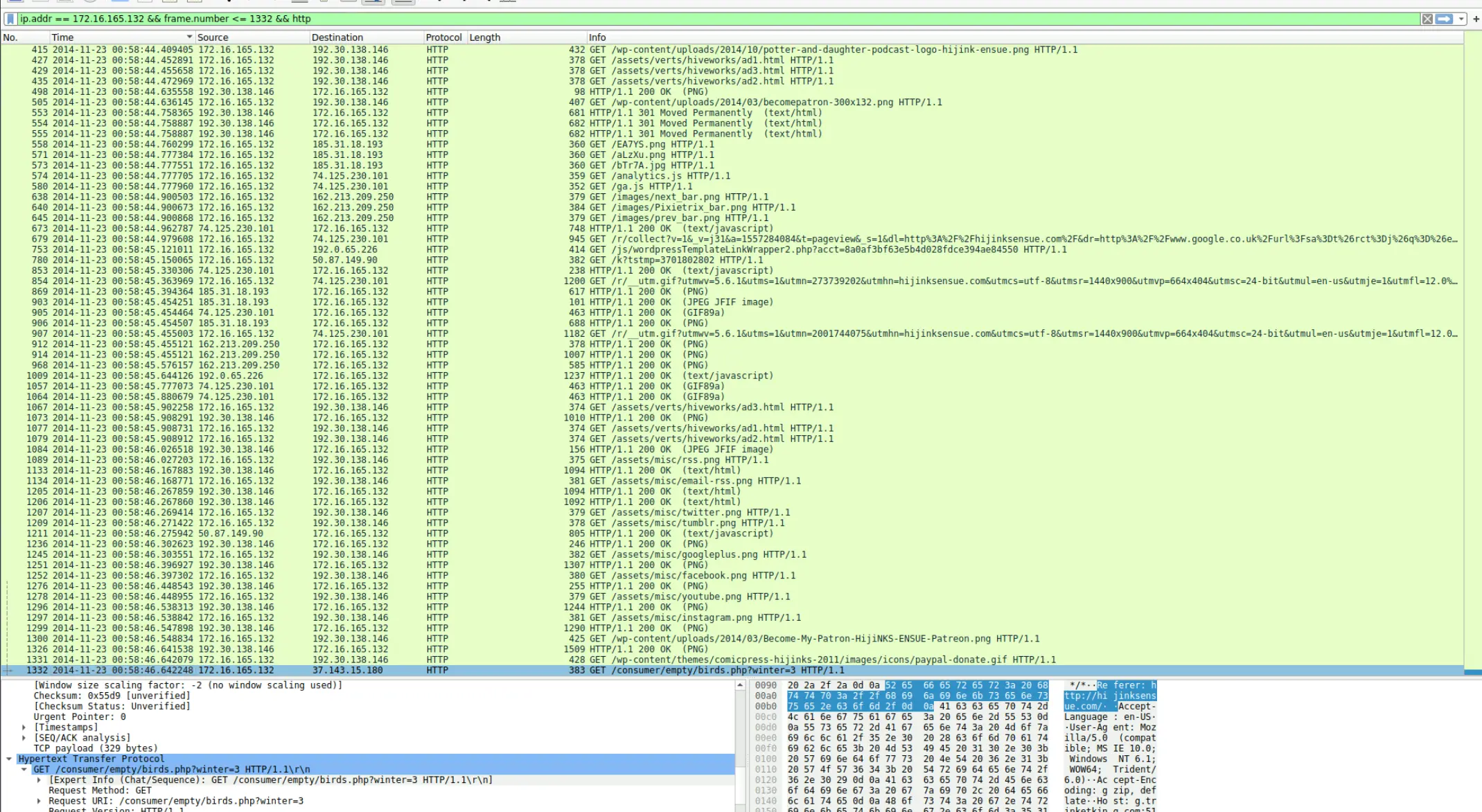
Result of query
If we focus on the following snippet of the results,

Interesting portion of the query results
We will see that there is another IP contacting 172.16.165.132 that we have not seen yet.
This IP is 50.87.149.90.
This IP is highly suspect because if we ignore the noisy requests regarding getting misc assets and word press content, this response happens just before the first GET request being made to 37.143.15.180.
Notably, the response returns javascript content.
If we follow this HTTP stream we will see a block of obfuscated javascript code.
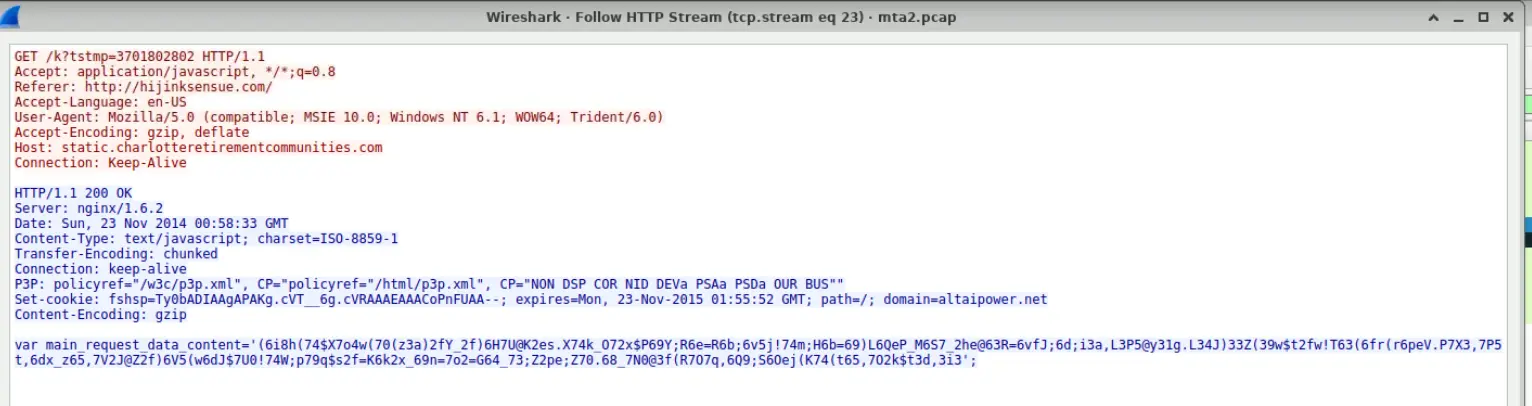
Obfuscated javascript
We do not have to decode this obfuscated javascript code as the main tell is the name of the variable itself and what happens after.
The variable is named main_request_data and we know that shortly after this, a request was made by 172.16.165.132 to download files from the malicious server.
It is highly probable and defensible that this conversation led to 172.16.165.132 landing on the malicious server.
We can also retrieve the request URI by performing the query
ip.addr == 172.16.165.132 && ip.addr == 50.87.149.90 && http
Which tells us [Request URI: http://static.charlotteretirementcommunities.com/k?tstmp=3701802802]
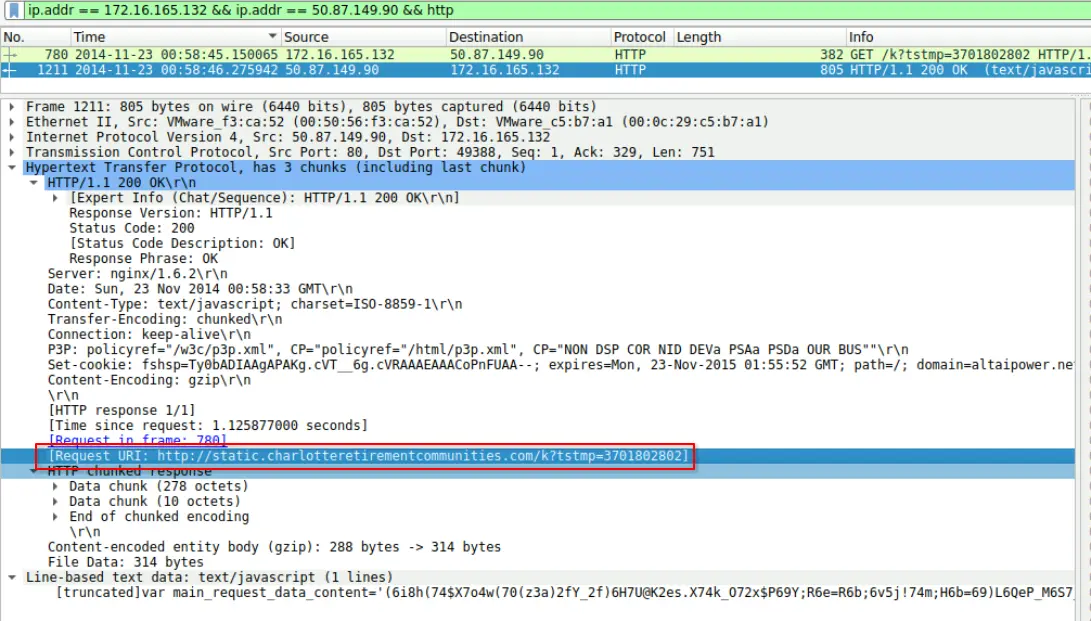
Request URI
Therefore, what initiated 172.16.165.132 to download the malware is malicious javascript obtained from http://static.charlotteretirementcommunities.com/k?tstmp=3701802802.
We also found out that 192.30.138.146 is a compromised server with FQDN http:\\hijinksensue.com that is referring victims to 37.143.15.180:51439.
Using this information, we can now answer the following questions.
Questions
Q1 — Infected Windows VM IP
What is the IP address of the Windows VM that gets infected?
Answer: 172.16.165.132
Q2 — Malicious IP and Port
What are the IP address and port number that delivered the exploit kit and malware?
Answer: 37.143.15.180:51439
Q3 — FQDN’s that delivered EKs
What are the two FQDN’s that delivered the exploit kit? comma-separated in alphabetical order.
Answer: g.trinketking.com,h.trinketking.com
Q4 — Compromised Website FQDN
What is the FQDN of the compromised website?
Answer: hijinksensue.com
Q5 — Name of EK
What is the name exploit kit (EK) that delivered the malware? (two words)
[!NOTE] One thing I want to note here is that the identification of the EK
Sweet Orangeis mainly inferred from OSINT reporting on knownQBotandSweet Orangecampaigns active around the same period, rather than confirmed directly from exploit artifacts. I attempted to close this gap by analysing the other files transmitted by37.143.15.180. In particular the first file transmitted. However, I could not find anything conclusive that would allow me to conclude that the exploit kit used here for certain isSweet Orange.
Answer: Sweet Orange
Q6 — Redirect URL to EK
What is the redirect URL that points to the exploit kit landing page?
Answer: static.charlotteretirementcommunities.com/k?tstmp=3701802802
Q7 — IP Address of redirect
What is the IP address of the redirect URL that points to the exploit kit landing page?
Answer: 50.87.149.90
Q8 — MD5 hash of malware
Extract the malware payload (PE file) from the PCAP. What is the MD5 hash?
Answer: 1408275c2e2c8fe5e83227ba371ac6b3
Q9 — CVE Used
What is the CVE of the exploited vulnerability?
To determine the CVE used we just search for information about the identified EK in the time frame of the network capture. It is important we scope our search to the same time frame because tools naturally change over time. This search results in the following,
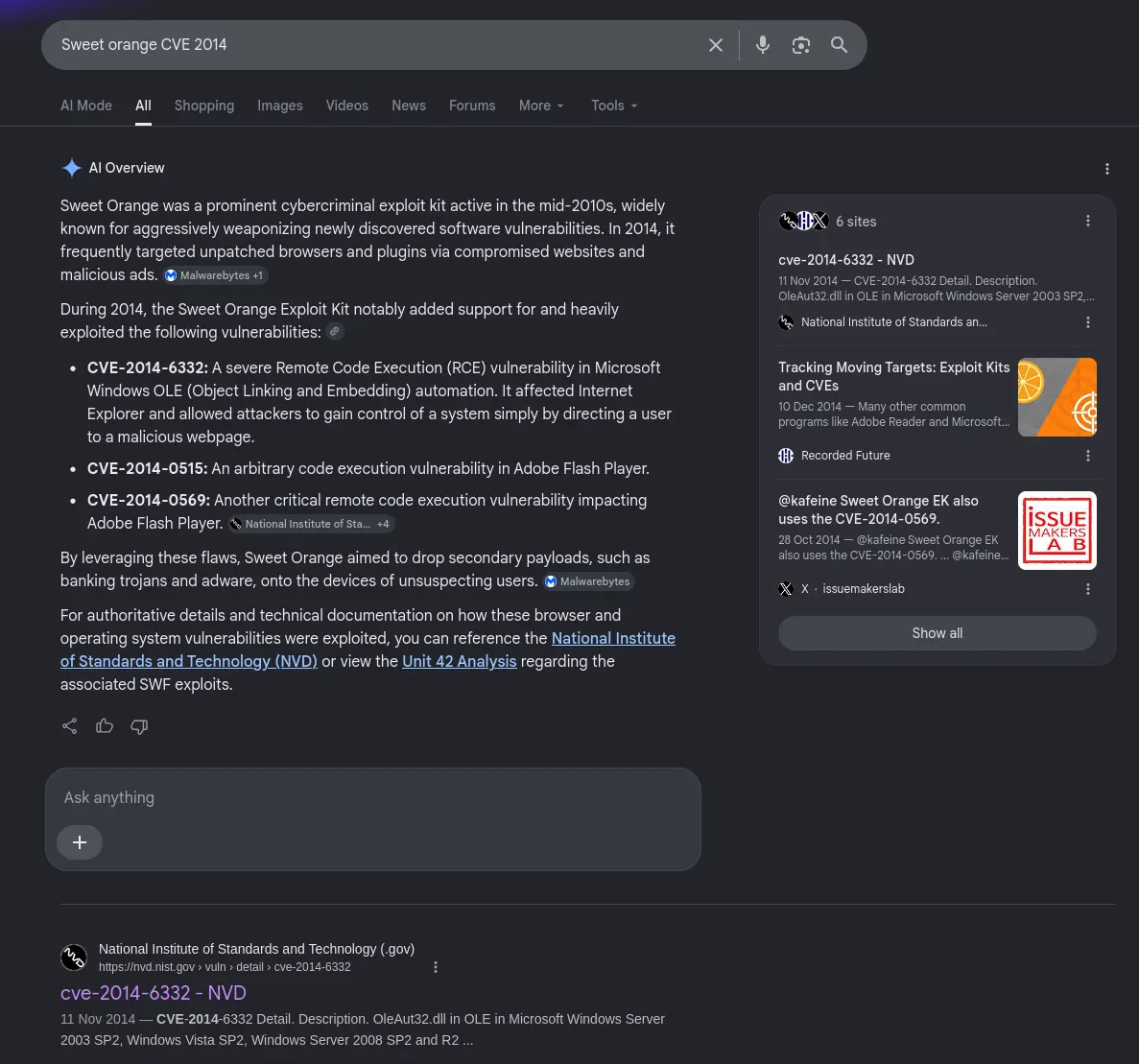
Google search results
I also found this article detailing a different major malvertising campaign where it states that the exploit kit used is Sweet Orange and the vulnerability exploited by the EK was CVE-2014-6332.
[!NOTE] Sweet Orange in this time period was actually known to have exploited multiple CVEs. The answer we found is again from OSINT reports about known campaigns that have utilised this exploit kit in particular rather than exploit artifacts in this capture.
Answer: CVE-2014-6332
Q10 — Referrer for URI that returned “f.txt”
What was the referrer for the visited URI that returned the file “f.txt”?
To find this we first need to find which IP even transmitted this file. We can do this through ZUI/Brim by performing the query,
_path == "files"
| cut id.orig_h,id.resp_h,filename
Which tells us the IP of the server serving this file is 74.125.230.109.
As seen below,
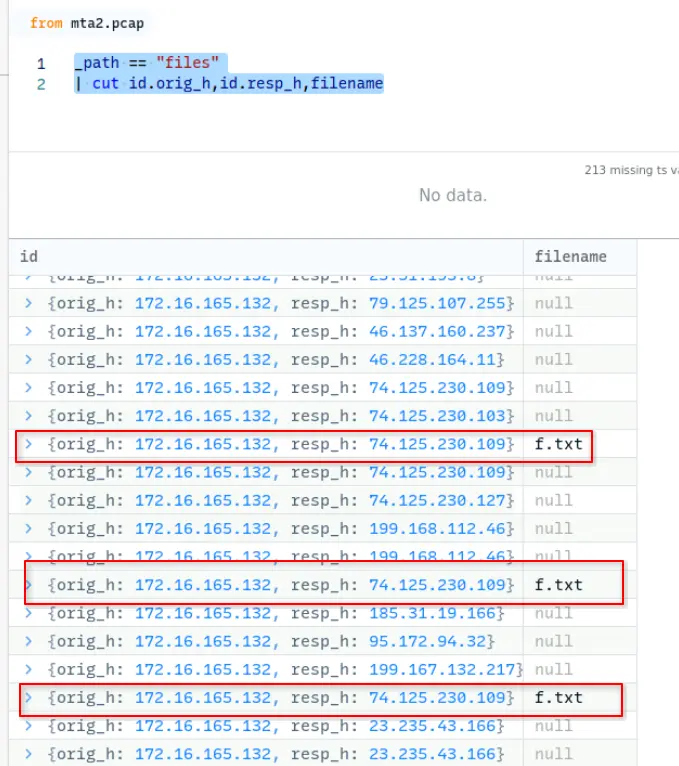
IP of server serving “f.txt”
We can then search for this IP in Wireshark through,
ip.addr == 74.125.230.109 && http
Which tells us that one of the request URIs for this file is
[Request URI: http://pagead2.googlesyndication.com/pagead/js/adsbygoogle.js].
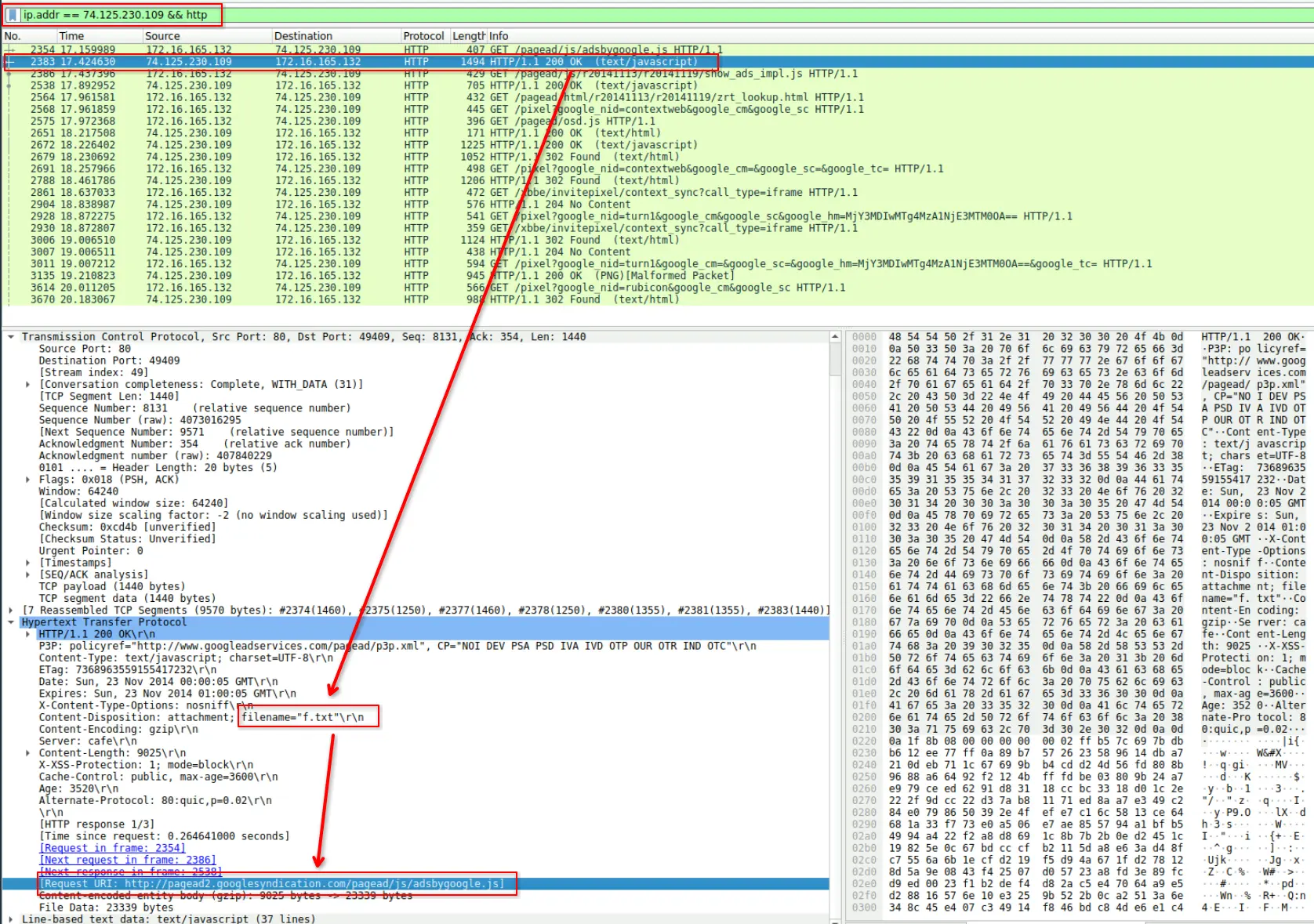
One of the request URI for “f.txt”
We can then click into the packet just before that made the request to that URI and find the referrer is Referer: http://hijinksensue.com/assets/verts/hiveworks/ad1.html\r\n.
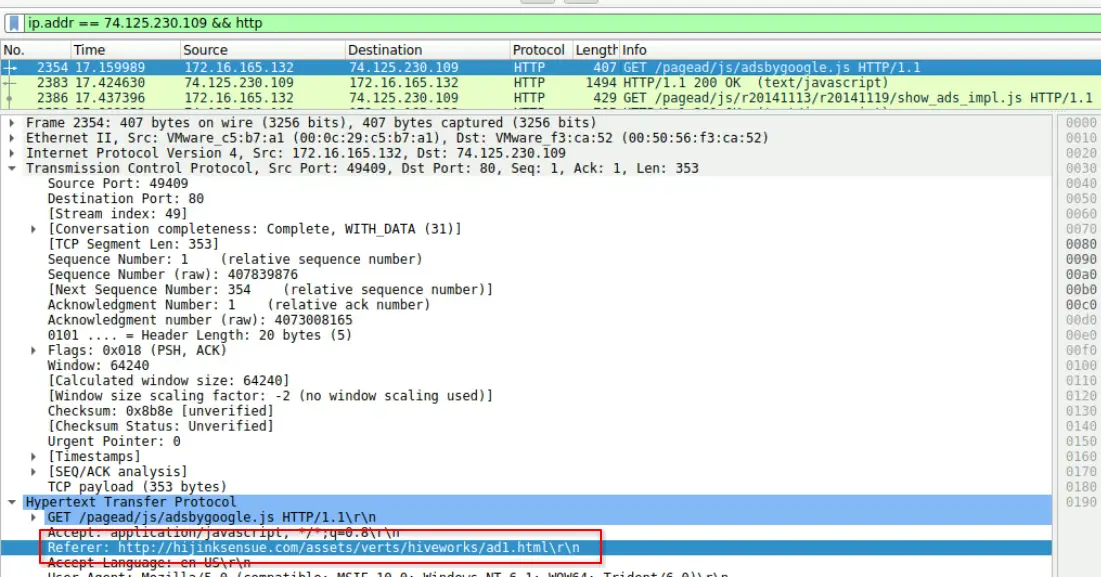
Identified Referrer
Answer: http://hijinksensue.com/assets/verts/hiveworks/ad1.html
Completion
I successfully completed Malware Traffic Analysis 2 Blue Team Lab at @CyberDefenders! https://cyberdefenders.org/blueteam-ctf-challenges/achievements/francisvil3213/malware-traffic-analysis-2/